hacking-tutorial
Encryption Crash Course
- Encryption Crash Course
- Symmetric Encryption (AES)
- Asymmetric Encryption (RSA)
- Diffie-Hellman Key Exchange
- Hash Functions
- HMAC (Hash-Based Message Authentication Code)
- Key Derivation Functions \& Password Hashing
- Digital Signatures
- One-Time Pad
- Public Key Infrastructure (PKI) \& Certificates
- SSL(Secure Sockets Layer) \& TLS(Transport Layer Security)
- Post-Quantum Cryptography

[!NOTE] Encryption is the process of converting plaintext into ciphertext to protect sensitive information from unauthorized access. It is a fundamental aspect of cybersecurity and is used to secure data in transit and at rest.
- There are 2 main components of encryption: the encryption algorithm and the encryption key.
- The algorithm is a mathematical function that takes the plaintext and the key as input and produces the ciphertext as output.
- The key is a secret value that is used to control the encryption and decryption process.
-
The algorithm and the key combination determines how the plain text will be modified or jumbled up, which is a process of substitution and transposition of the characters. If the algorithm and Key are weak encryption will also be weak.
- There are two main types of encryption: symmetric and asymmetric. Symmetric encryption uses the same key for both encryption and decryption, while asymmetric encryption uses a pair of keys (public and private) for encryption and decryption.
| Symmetric Encryption | Asymmetric Encryption |
|---|---|
| - Uses a single key for both encryption and decryption. - Faster than asymmetric encryption. - Examples: AES, DES, RC4. | - Uses a pair of keys (public and private) for encryption and decryption. - Slower than symmetric encryption. - Examples: RSA, ECC, DSA. |
| - Key distribution can be a challenge since the same key must be shared securely between parties. - Suitable for encrypting large amounts of data. | - Key distribution is easier since the public key can be shared openly, while the private key remains secure. - Often used for encrypting small amounts of data, such as digital signatures and key exchange. |
| - Commonly used for encrypting files, databases, and communication channels. | - Commonly used for secure communication, digital signatures, and key exchange. |
| - Examples of symmetric encryption algorithms include AES (Advanced Encryption Standard), DES (Data Encryption Standard), and RC4. | - Examples of asymmetric encryption algorithms include RSA (Rivest-Shamir-Adleman), ECC (Elliptic Curve Cryptography), and DSA (Digital Signature Algorithm). |
| - Symmetric encryption is generally faster than asymmetric encryption, making it suitable for encrypting large amounts of data. | - Asymmetric encryption is generally slower than symmetric encryption, making it more suitable for encrypting small amounts of data, such as digital signatures and key exchange. |
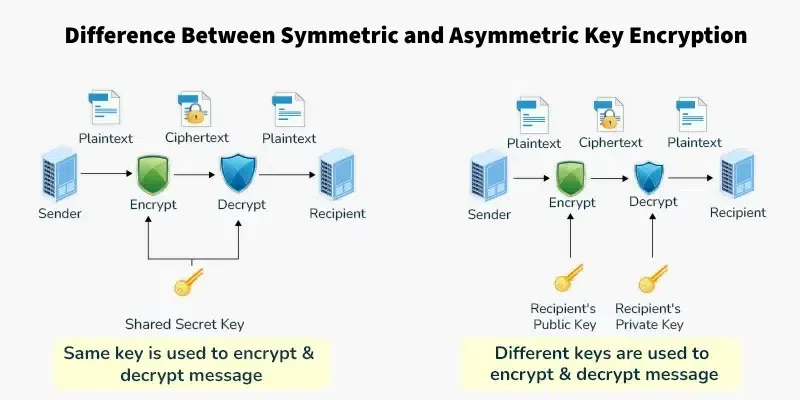
Symmetric Encryption (AES)
- Symmetric encryption is a type of encryption where the same key is used for both encryption and decryption. This means that both the sender and the receiver must have access to the same key in order to communicate securely.
sequenceDiagram
    participant Sender
    participant Receiver

    Sender->>Sender: Generate Secret Key
    Sender->>Sender: Encrypt Plaintext with Secret Key
    Sender->>Receiver: Send Ciphertext
    Receiver->>Receiver: Decrypt Ciphertext with Secret Key
    Receiver->>Receiver: Obtain Original Plaintext
Symmetric encryption involves the following steps:
- Key Generation: A secret key is generated. This key must be kept confidential between the communicating parties.
- Encryption: The sender uses the secret key and an encryption algorithm (such as AES or DES) to convert the plaintext into ciphertext.
- Transmission: The ciphertext is sent to the receiver over the communication channel.
- Decryption: The receiver, who also possesses the same secret key, uses it with the decryption algorithm to convert the ciphertext back into the original plaintext.
Note: The security of symmetric encryption relies entirely on keeping the key secret. If the key is intercepted or leaked, the encrypted data can be easily decrypted.
-
Example of Symmetric Encryption:
- We open 2 terminals — one is the sender terminal, and the other is the receiver terminal. We will use AES encryption for this example.
- The sender terminal will ask us for a message we want to send. The sender terminal will generate the secret, and then use the encryption algorithm to encrypt the message and send it to the receiver terminal.
-
The receiver terminal will ask us for the secret key, and then it will use the decryption algorithm to decrypt the message and display it.
-
Here’s the
SHELLcode for the sender terminal:#!/bin/sh echo "Enter the message you want to send:" read -r message # Generate a random secret key secret_key=$(openssl rand -hex 16) # Encrypt the message using AES encryption ciphertext=$(echo "$message" | openssl enc -aes-256-cbc -a -salt -pass pass:"$secret_key") # Save the secret key and ciphertext to files to simulate sending echo "$secret_key" > secret.key echo "Secret key generated and saved to secret.key: $secret_key" echo "$ciphertext" > message.enc echo "Ciphertext generated and saved to message.enc: $ciphertext" echo "Message encrypted and sent." -
Here’s the
SHELLcode for the receiver terminal:#!/bin/sh echo "Waiting for message (timeout 5 minutes)..." timeout=300 elapsed=0 while [ $elapsed -lt $timeout ]; do if [ -f "secret.key" ] && [ -f "message.enc" ]; then # Read the secret key and ciphertext from files secret_key=$(cat secret.key) echo "Secret Key: $secret_key" ciphertext=$(cat message.enc) echo "Ciphertext: $ciphertext" # Decrypt the message using AES decryption plaintext=$(echo "$ciphertext" | openssl enc -aes-256-cbc -a -d -salt -pass pass:"$secret_key") echo "Decrypted Message: $plaintext" # Clean up the temporary files rm secret.key message.enc exit 0 fi sleep 1 elapsed=$((elapsed + 1)) done echo "Timeout reached. No message received."
-
Here’s what it looks like when we run the sender terminal:


- Some of the mainly used symmetric encryption algorithms include:
- AES (Advanced Encryption Standard): A widely used encryption algorithm that is considered secure and efficient. It supports key sizes of 128, 192, and 256 bits.
- DES (Data Encryption Standard): An older encryption algorithm that is now considered weak due to its short key length (56 bits). It has been largely replaced by AES.
- RC4: A stream cipher that was widely used in the past but is now considered insecure due to vulnerabilities discovered in its design.
- Triple DES (3DES): An enhancement of DES that applies the DES algorithm three times to increase security. It is still considered secure but is slower than AES and is being phased out in favor of AES.
- Blowfish: A symmetric encryption algorithm that is designed to be fast and secure. It supports key sizes of up to 448 bits and is often used in applications where speed is a concern.
- RC5: A symmetric encryption algorithm that is designed to be simple and efficient. It supports variable block sizes and key sizes, making it flexible for different applications.
- RC6: An improvement over RC5, designed to be more secure and efficient. It supports block sizes of 128 bits and key sizes of up to 256 bits.
- Some of the latest implementations of Symmetric Encryption in real-world applications include:
- AES-GCM (Galois/Counter Mode): A mode of AES that provides both confidentiality and integrity. It is widely used in secure communication protocols such as TLS (Transport Layer Security) and is considered one of the most secure modes of operation for AES.
- AES-CCM (Counter with CBC-MAC): Another mode of AES that provides both confidentiality and integrity. It is commonly used in wireless communication protocols such as IEEE 802.15.4 and is also considered secure.
- ChaCha20-Poly1305: A modern symmetric encryption algorithm that combines the ChaCha20 stream cipher with the Poly1305 message authentication code. It is designed to be fast and secure, and is used in applications such as TLS 1.3 and Google’s QUIC protocol.
Block Cipher Modes of Operation
[!NOTE] AES itself only knows how to encrypt one fixed-size block of data (16 bytes) at a time. A mode of operation is the recipe for stitching many blocks together to encrypt a real message of any length. Picking the wrong mode can leak information even though the underlying cipher (AES) is perfectly secure.
- ECB (Electronic Codebook): Encrypts every block independently with the same key. Simple, but identical plaintext blocks produce identical ciphertext blocks — patterns in the input (like a solid-color image) leak straight through. Never use this in real systems.
- CBC (Cipher Block Chaining): XORs each plaintext block with the previous ciphertext block before encrypting, using a random Initialization Vector (IV) to start the chain. Hides patterns, but needs padding and is vulnerable to padding-oracle attacks if implemented carelessly.
- CTR (Counter Mode): Turns the block cipher into a stream cipher by encrypting an incrementing counter and XOR-ing the result with the plaintext. Fast, parallelizable, and avoids padding — but reusing a counter/nonce with the same key is catastrophic.
-
GCM (Galois/Counter Mode): CTR mode plus a built-in authentication tag. It gives you confidentiality and integrity in one pass, which is why it’s the default choice for TLS, SSH, and most modern protocols.
-
Quick example — watch ECB leak a repeated block, and CBC hide it:
# A fixed key/IV so the demo is reproducible — generate your own with
# openssl rand -hex 32 (key) and openssl rand -hex 16 (IV) in practice
KEY=b54971c7f30209393d8f460a0e2834a2334842fa1d109856ed05565689b5cabe
IV=7e17a6f53e8066d4c8c74bbaa3687fa5

# Two identical 16-byte blocks back to back
echo -n "SECRET_BLOCK_XYZSECRET_BLOCK_XYZ" | openssl enc -aes-256-ecb -K "$KEY" | xxd
# rows 1 and 2 of the output are IDENTICAL — that's the leak

echo -n "SECRET_BLOCK_XYZSECRET_BLOCK_XYZ" | openssl enc -aes-256-cbc -K "$KEY" -iv "$IV" | xxd
# every row is different, even though the plaintext blocks repeat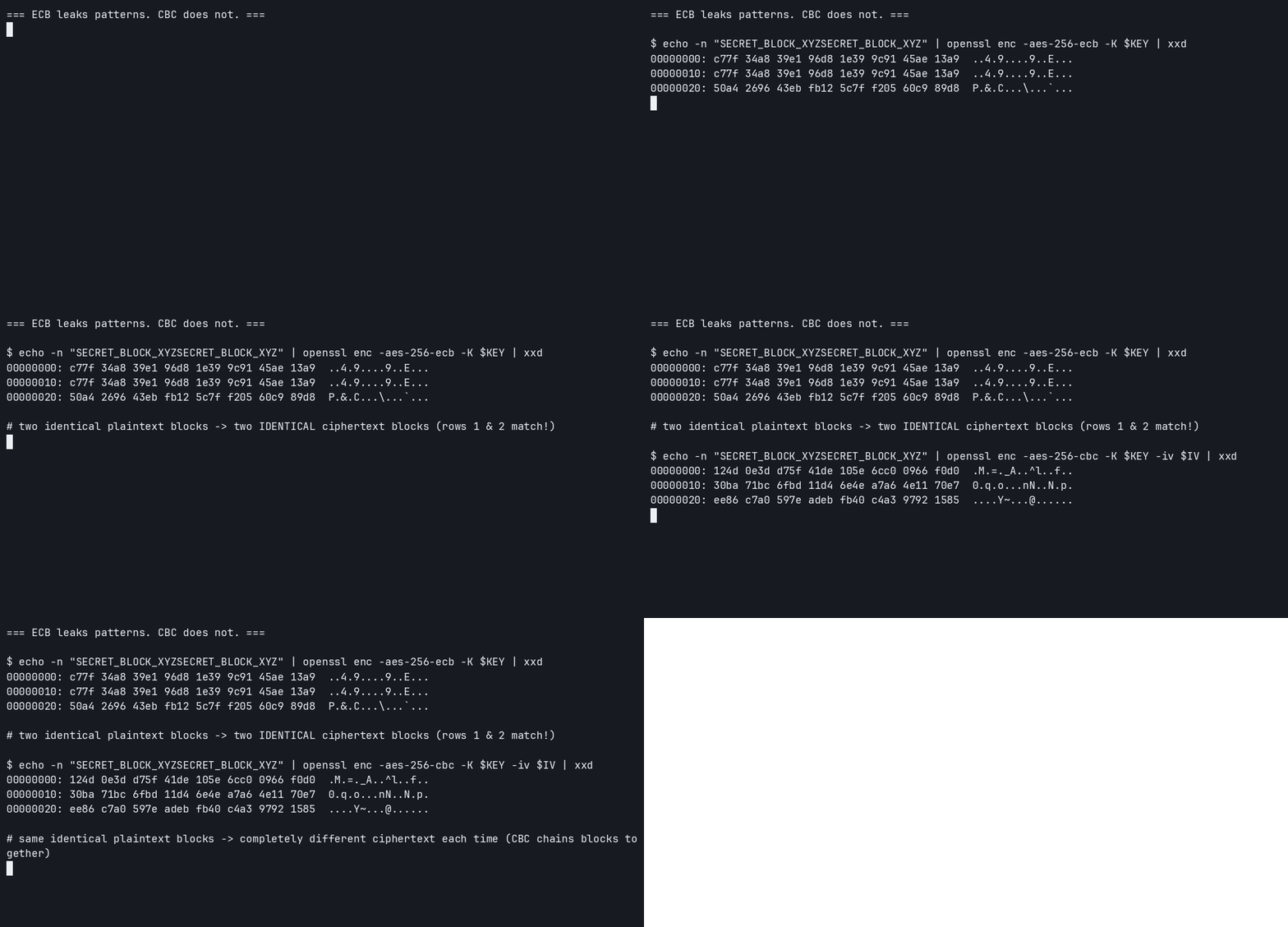
[!TIP] Rule of thumb: prefer an AEAD (Authenticated Encryption with Associated Data) mode like AES-GCM or ChaCha20-Poly1305 over plain CBC or CTR. AEAD modes detect tampering automatically instead of relying on you to add a separate integrity check.
Asymmetric Encryption (RSA)
[!NOTE] Asymmetric encryption, also known as public-key cryptography, is a type of encryption that uses a pair of keys: a public key for encryption and a private key for decryption. This allows for secure communication without the need for the sender and receiver to share a secret key beforehand.
sequenceDiagram
    participant Sender
    participant Receiver

    Note right of Receiver: 1. Key Generation
    Receiver->>Receiver: Generates Key Pair (Public & Private Keys)

    Note over Sender, Receiver: 2. Key Exchange
    Receiver->>Sender: Sends Public Key (Open Channel)

    Note left of Sender: 3. Encryption
    Sender->>Sender: Encrypts Plaintext using Receiver's Public Key

    Note over Sender, Receiver: 4. Transmission
    Sender->>Receiver: Sends Ciphertext (Potentially Insecure Channel)

    Note right of Receiver: 5. Decryption
    Receiver->>Receiver: Decrypts Ciphertext using Private Key
    Receiver->>Receiver: Obtains Original Plaintext
-
Asymmetric encryption uses 2 keys: a public key and a private key. The public key is used for encryption, while the private key is used for decryption. The sender encrypts the plaintext using the receiver’s public key, and the receiver decrypts the ciphertext using their private key.
-
Asymmetric encryption involves the following steps:
- Key Generation: The receiver generates a pair of keys, a public key and a private key. The public key can be shared openly, while the private key must be kept secret.
- Key Exchange: The receiver sends the public key to the sender over an open channel.
- Encryption: The sender uses the receiver’s public key to encrypt the plaintext message.
- Transmission: The sender sends the ciphertext to the receiver over a potentially insecure channel.
- Decryption: The receiver uses their private key to decrypt the ciphertext and obtain the original plaintext message.
[!IMPORTANT] Note: The security of asymmetric encryption relies on the difficulty of certain mathematical problems, such as factoring large integers (in the case of RSA) or solving the discrete logarithm problem (in the case of ECC). As long as these problems remain computationally infeasible to solve, asymmetric encryption can provide strong security.
- Some of the mainly used asymmetric encryption algorithms include:
- RSA (Rivest-Shamir-Adleman): One of the most widely used asymmetric encryption algorithms. It is based on the difficulty of factoring large integers and is commonly used for secure communication, digital signatures, and key exchange.
- ECC (Elliptic Curve Cryptography): An asymmetric encryption algorithm that uses elliptic curves to provide strong security with smaller key sizes compared to RSA. It is often used in mobile devices and other resource-constrained environments.
- DSA (Digital Signature Algorithm): An asymmetric encryption algorithm specifically designed for digital signatures. It is based on the discrete logarithm problem and is commonly used for signing documents and verifying the authenticity of messages.
- DH (Diffie-Hellman): An asymmetric encryption algorithm used for secure key exchange. It allows two parties to establish a shared secret key over an insecure channel without the need for a pre-shared key.
[!IMPORTANT]
- If you encrypt with the public key, you can only decrypt with the private key. This means confidentiality is what matters the most. This is called Open Message Confidentiality (OMC). It is used to ensure that only the intended recipient can read the message. If the sender encrypts the message with the receiver’s public key, only the receiver can decrypt it with their private key, thus ensuring confidentiality.
- If you encrypt with the private key, you can only decrypt with the public key. This means authentication is what matters the most. This is called Open Message Authentication (OMA). It is used to verify the authenticity of the sender. If the sender encrypts the message with their private key, anyone can decrypt it with the sender’s public key, but only the sender could have encrypted it in the first place, thus verifying their identity.
-
Why Emails don’t use Asymmetric Encryption?
- Asymmetric encryption is computationally intensive and slower than symmetric encryption. Encrypting large email messages with asymmetric encryption would result in significant performance issues.
- Instead, emails typically use PGP (Pretty Good Privacy) or S/MIME (Secure/Multipurpose Internet Mail Extensions), which combine asymmetric encryption for key exchange and symmetric encryption for the actual message content. This allows for secure email communication while maintaining performance.
Advantages of Asymmetric Encryption:
- Better Key Distribution: Asymmetric encryption allows for easier key distribution since the public key can be shared openly, while the private key remains secure. This eliminates the need for secure channels to exchange keys, which is a major challenge in symmetric encryption.
- Scalability: Asymmetric encryption is more scalable than symmetric encryption, as it does not require the sender and receiver to share a secret key beforehand. This makes it suitable for large-scale applications such as secure communication over the internet.
- Authentication and nonrepudiation: Asymmetric encryption can provide authentication and nonrepudiation, as the sender can sign the message with their private key, and the receiver can verify the signature with the sender’s public key. This ensures that the message has not been tampered with and that the sender cannot deny sending the message.
- Slower than Symmetric Encryption: Asymmetric encryption is generally slower than symmetric encryption due to the mathematical complexity of the algorithms involved. This makes it less suitable for encrypting large amounts of data, but it is often used for encrypting small amounts of data, such as digital signatures and key exchange.
- Mathematically Complex: Asymmetric encryption relies on complex mathematical problems, such as factoring large integers or solving the discrete logarithm problem. This makes it more secure against brute-force attacks, but it also means that it requires more computational resources compared to symmetric encryption.
Diffie-Hellman Key Exchange
[!NOTE] Diffie-Hellman (DH) is not an encryption algorithm at all — it’s a way for two parties to agree on a shared secret over a public channel that an eavesdropper, watching every message, still cannot compute. That shared secret then becomes the key for a symmetric algorithm like AES.
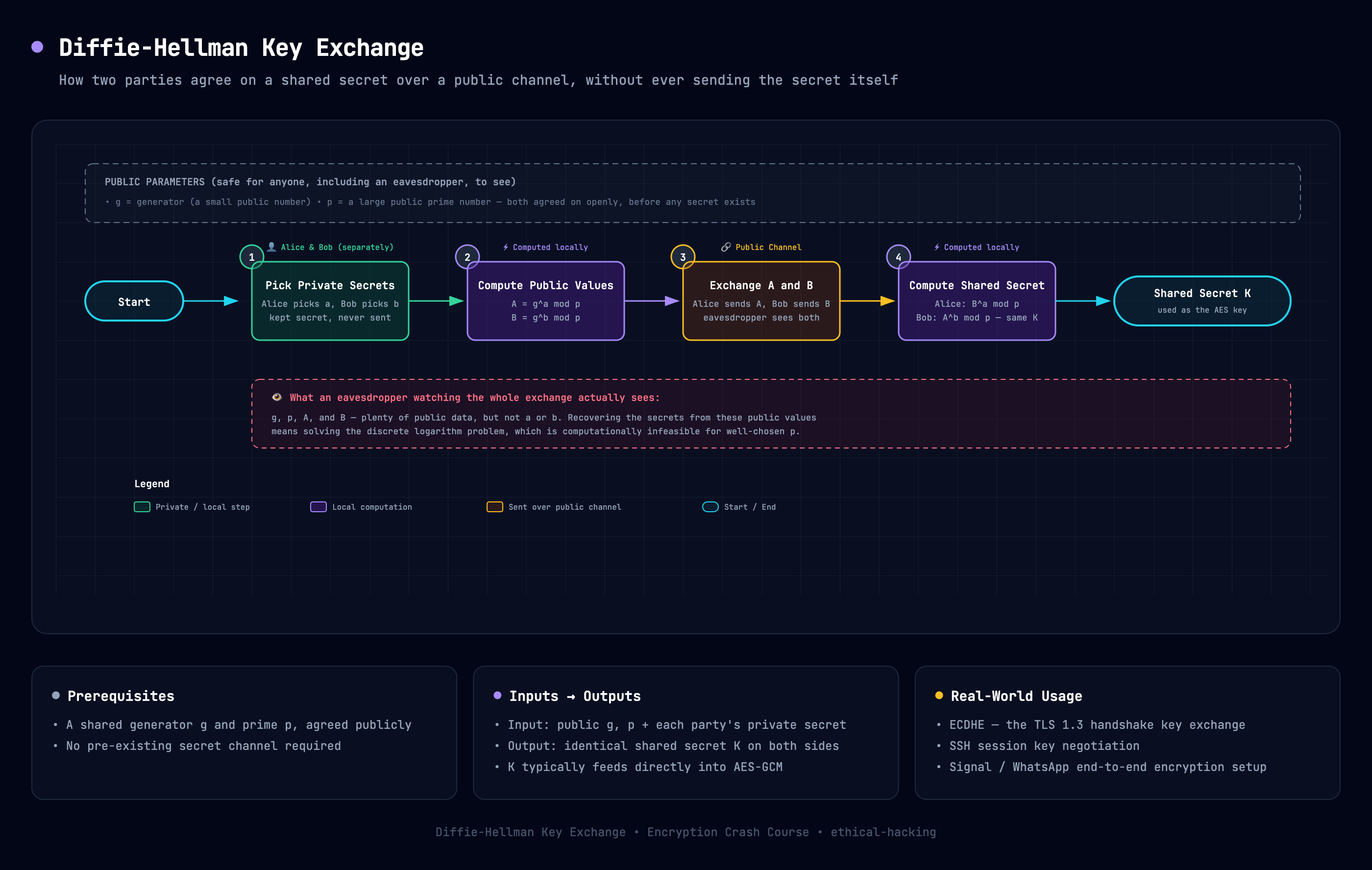
Open the interactive diagram — exportable as PNG/PDF.
- The paint-mixing analogy: Imagine Alice and Bob publicly agree on a common paint color (visible to everyone). Each of them privately mixes in a secret color of their own and sends the mixed result to the other, still in public view. Each then adds their own secret color again to the mixture they received. Both end up at the same final color, but anyone watching only saw the public color and two mixed blends — not enough to reverse-engineer either secret. The math version uses modular exponentiation instead of paint, but the intuition is identical.
- Why it matters: DH solves the “chicken and egg” problem of symmetric encryption — you need a shared key to talk securely, but you need a secure channel to share that key. DH breaks the loop.
- ECDHE (Elliptic Curve Diffie-Hellman Ephemeral): The modern variant used in TLS. “Ephemeral” means a brand-new key pair is generated for every session, which is what gives TLS its Perfect Forward Secrecy (see the SSL/TLS section below).
- Limitation: Plain Diffie-Hellman gives you a shared secret, but not identity. It doesn’t tell you who you’re talking to — that’s why TLS pairs DH with certificates and digital signatures for authentication.
Hash Functions
[!NOTE] A hash function is a mathematical function that takes an input (or “message”) and produces a fixed-size string of bytes, typically a digest that is unique to the input. Hash functions are commonly used in cryptography for various purposes, including data integrity verification, password hashing, and digital signatures.
- Hash functions have several important properties:
- Deterministic: The same input will always produce the same output.
- Fast to compute: Hash functions should be efficient to compute for any given input.
- Pre-image resistance: It should be computationally infeasible to reverse-engineer the original input from its hash output.
- Collision resistance: It should be computationally infeasible to find two different inputs that produce the same hash output.
sequenceDiagram
    participant User
    participant HashFunction
    participant Database
    User->>HashFunction: Input Data (e.g., Password)
    HashFunction->>HashFunction: Compute Hash Digest
    HashFunction->>Database: Store Hash Digest
    User->>Database: Login Attempt with Password
    Database->>HashFunction: Retrieve Stored Hash Digest
    HashFunction->>HashFunction: Compute Hash Digest of Login Attempt
    HashFunction->>Database: Compare Hash Digests
    Database->>User: Authentication Result (Success/Failure)
-
Let’s see this with an example:
-
We will create a simple password hashing system using the SHA-256 hash function. The user will input a password, which will be hashed and stored in a database (simulated with a file). When the user attempts to log in, they will input their password again, and the system will hash it and compare it to the stored hash to verify their identity.
-
Here’s the
SHELLcode for the password hashing system:#!/bin/sh echo "Enter your password:" read -r password # Hash the password using SHA-256 hashed_password=$(echo -n "$password" | openssl dgst -sha256) # Store the hashed password in a file (simulating a database) echo "$hashed_password" > password.hash echo "Password hashed and stored." echo "Login attempt. Enter your password:" read -r login_password # Hash the login attempt password hashed_login_password=$(echo -n "$login_password" | openssl dgst -sha256) # Retrieve the stored hashed password stored_hashed_password=$(cat password.hash) if [ "$hashed_login_password" = "$stored_hashed_password" ]; then echo "Authentication successful!" else echo "Authentication failed!" fi
-
- This is how it works:
- The user is prompted to enter a password, which is then hashed using the SHA-256 algorithm and stored in a file
called
password.hash. - When the user attempts to log in, they are prompted to enter their password again. The system hashes this input and compares it to the stored hash.
- If the hashes match, authentication is successful; otherwise, it fails.

- The user is prompted to enter a password, which is then hashed using the SHA-256 algorithm and stored in a file
called
- There are many hash functions available, each with its own characteristics and use cases. Some of the most commonly
used hash functions include:
- MD5 (Message Digest Algorithm 5): An older hash function that produces a 128-bit hash value. It is now considered weak due to vulnerabilities that allow for collision attacks.
- SHA-1 (Secure Hash Algorithm 1): A hash function that produces a 160-bit hash value. It is also considered weak due to vulnerabilities that allow for collision attacks.
- SHA-256 (Secure Hash Algorithm 256): A widely used hash function that produces a 256-bit hash value. It is currently considered secure and is commonly used in various applications, including password hashing and digital signatures.
- SHA-3 (Secure Hash Algorithm 3): The latest member of the SHA family, designed to provide improved security and performance. It supports variable output sizes and is based on the Keccak algorithm.
- HAVAL: A hash function that allows for variable output sizes (128, 160, 192, 224, or 256 bits) and is designed to be fast and secure.
-
Crypto systems today use SHA-256 or above for hashing, and MD5 and SHA-1 are considered weak and should be avoided for secure applications.
- Hash functions are used for various purposes in cryptography, including:
- Data integrity verification: Hash functions can be used to verify that data has not been tampered with. By comparing the hash of the original data with the hash of the received data, you can determine if the data has been altered.
- Password hashing: Hash functions are commonly used to securely store passwords. Instead of storing the plaintext password, systems store the hash of the password. When a user attempts to log in, their input is hashed and compared to the stored hash for authentication.
- Digital signatures: Hash functions are used in digital signature algorithms to create a unique representation of a message. The sender hashes the message and then encrypts the hash with their private key to create a digital signature. The receiver can verify the signature by decrypting it with the sender’s public key and comparing it to their own hash of the message.
- Let’s take an example where we downloaded a ISO file from the internet, and we want to verify its integrity. We can use a hash function to compute the hash of the downloaded file and compare it to the hash provided by the source. If the hashes match, we can be confident that the file has not been tampered with during the download process.
HMAC (Hash-Based Message Authentication Code)
[!NOTE] A plain hash proves data hasn’t changed, but it doesn’t prove who sent it — anyone can recompute a SHA-256 hash. An HMAC fixes this by mixing a shared secret key into the hashing process, so only someone who knows the key could have produced that specific hash.
- HMAC combines a hash function (like SHA-256) with a secret key using a specific construction: roughly
HMAC(key, message) = hash((key XOR opad) + hash((key XOR ipad) + message)). You don’t need to memorize the formula — just remember it’s “hash the message, but salted with a secret key in a very specific, collision-resistant way.” - What it gives you: Both integrity (the message wasn’t altered) and authenticity (only someone with the key could have created it) — in one cheap operation. This is much faster than a full digital signature.
- Where it’s used: API request signing (e.g., AWS Signature V4), JWT tokens (the
HS256algorithm), securing webhooks, and as the integrity check inside older TLS cipher suites. -
Quick example — generating and verifying an HMAC with OpenSSL:
# Sign a message with a shared secret
echo -n "hello world" | openssl dgst -sha256 -hmac "supersecretkey"

# The receiver, who also knows "supersecretkey", recomputes the same HMAC
# and checks it matches — if it does, the message is both untampered and
# confirmed to have come from someone who holds the shared key.
Try it yourself — same command, same key, twice in a row, then a wrong key:
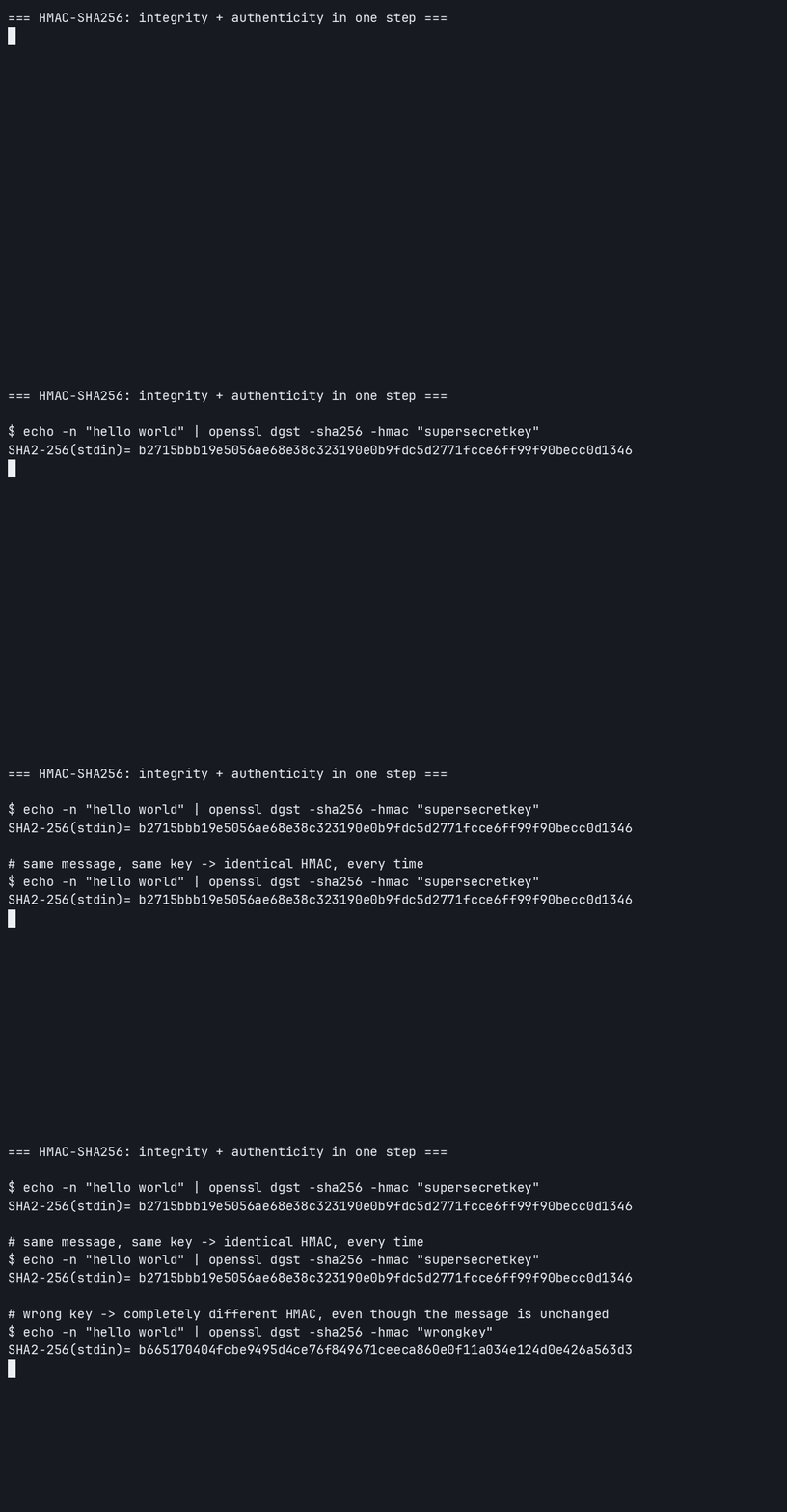
[!IMPORTANT] HMAC uses a shared secret (symmetric), while digital signatures use a private/public key pair (asymmetric). That’s the key distinction: HMAC is faster but both sides must already trust each other with the same key; digital signatures are slower but let anyone with the public key verify authenticity, with no shared secret required.
Key Derivation Functions & Password Hashing
[!NOTE] Generic hash functions like SHA-256 are built to be fast — great for checksums, terrible for passwords. A GPU can try billions of SHA-256 guesses per second. Key Derivation Functions (KDFs) are deliberately slow and memory-hungry hash functions designed specifically to make password cracking expensive.
- Salting: Before hashing, a random value (the “salt”) is mixed into the password. This ensures two users with the same password get completely different hashes, and defeats precomputed lookup tables (rainbow tables).
- PBKDF2 (Password-Based Key Derivation Function 2): Repeatedly re-hashes the password thousands of times (an adjustable “iteration count”) to slow down brute-force attempts. Widely supported but purely CPU-bound, which makes it easier to accelerate on custom hardware (GPUs/ASICs) than the options below.
- bcrypt: Built specifically for password hashing, with a tunable “cost factor” that you increase over time as hardware gets faster. A long-standing, battle-tested default for web application login systems.
- scrypt: Like PBKDF2, but also deliberately consumes a lot of memory, which makes it far more expensive to parallelize on GPUs or custom cracking hardware.
-
Argon2: Winner of the 2015 Password Hashing Competition and the current recommended default. Tunable across three dimensions — time, memory, and parallelism — giving you fine control over the cost of cracking attempts.
-
Quick example — timing a fast hash against bcrypt (requires the Apache
htpasswdutility, preinstalled on most Linux/macOS systems —apt install apache2-utilsif it’s missing):# A generic hash: near-instant, which is exactly the problem for passwords time (echo -n "password123" | openssl dgst -sha256) # bcrypt at cost factor 12: deliberately slow, on purpose time (htpasswd -bnBC 12 "" "password123")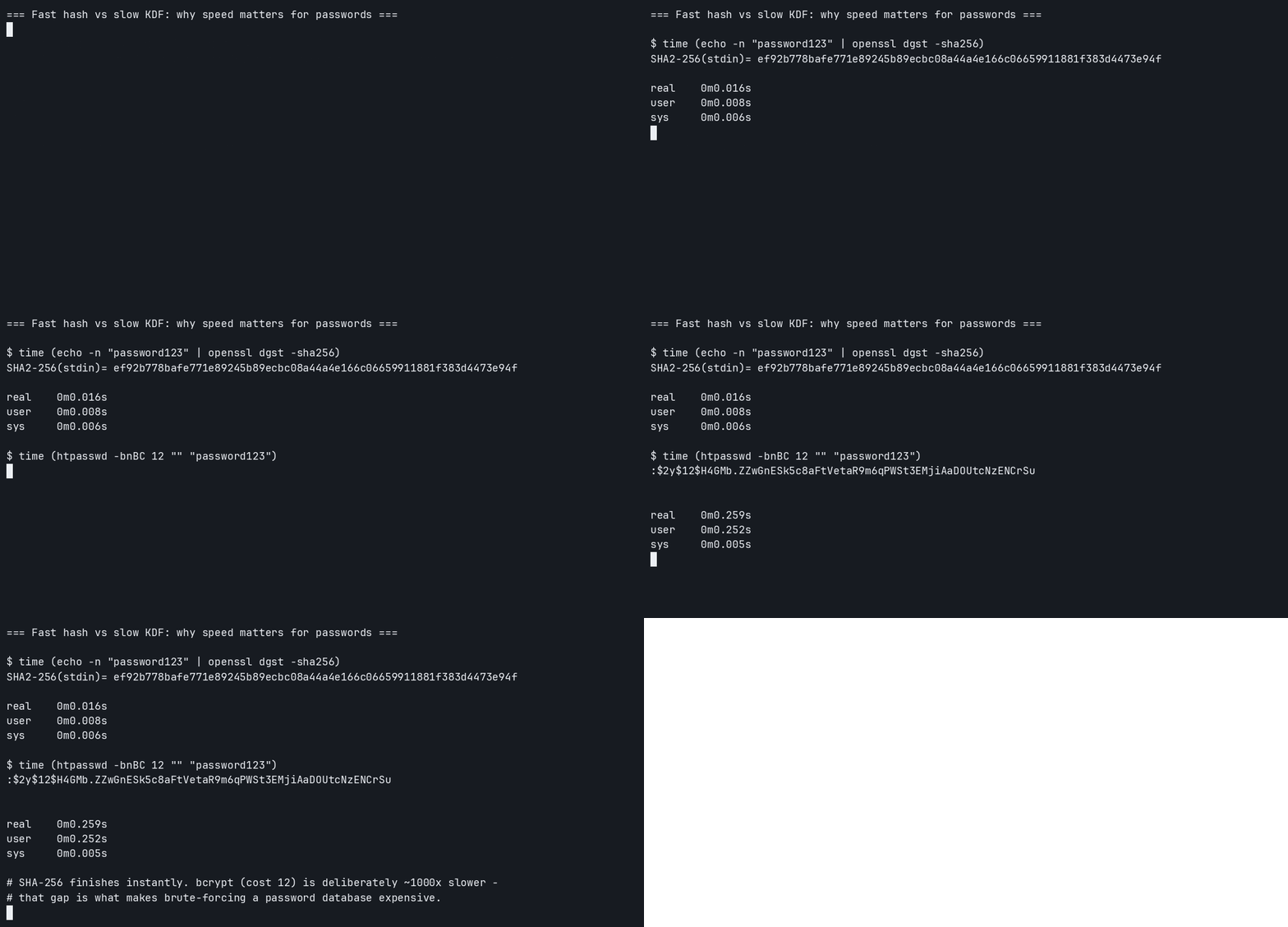
[!TIP] Rule of thumb for new projects: use Argon2id if available, otherwise bcrypt. Never store passwords with a plain hash function like SHA-256 or MD5, even with a salt — they’re simply too fast to brute-force at scale.
Digital Signatures
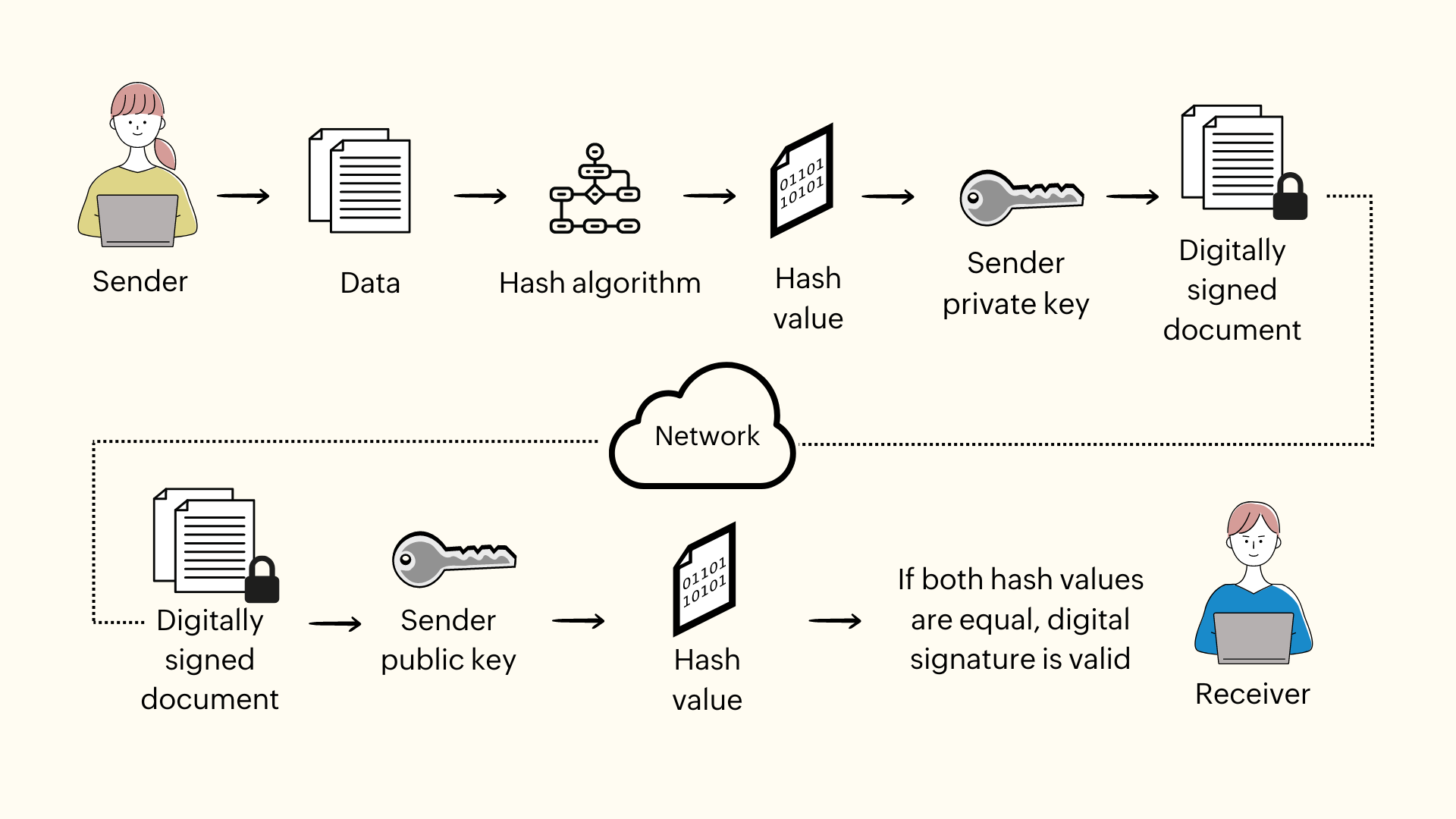
[!IMPORTANT] Digital signatures are a cryptographic mechanism used to verify the authenticity and integrity of digital messages or documents. They provide a way to ensure that a message has not been altered and that it was indeed sent by the claimed sender.
-
The Digital Signatures are created when the sender generates a hash of the message and then encrypts that hash with their private key. The resulting encrypted hash is the digital signature, which is sent along with the original message.
-
The hash of the message is created using a hash function, which produces a fixed-size output that is unique to the input message. This hash serves as a fingerprint of the message, allowing the receiver to verify that the message has not been altered.
-
Let’s try to understand this through an example. We have a sender shell script that generates a digital signature for a message and a receiver shell script that verifies the digital signature.
-
Here’s the
SHELLcode for the sender terminal:#!/bin/sh echo "Enter the message you want to sign:" read -r message # Generate a hash of the message message_hash=$(echo -n "$message" | openssl dgst -sha256) # Generate Private and Public Key Pair (if not already generated) if [ ! -f sender_private.key ]; then openssl genpkey -algorithm RSA -out sender_private.key -pkeyopt rsa_keygen_bits:2048 openssl rsa -pubout -in sender_private.key -out sender_public.key fi # Encrypt the hash with the senders private key to create the digital signature digital_signature=$(echo -n "$message_hash" | openssl rsautl -sign -inkey sender_private.key) # Save the message and digital signature to files to simulate sending echo "$message" > message.txt echo "$digital_signature" > signature.bin echo "Message signed and sent." -
Here’s the
SHELLcode for the receiver terminal:#!/bin/sh echo "Waiting for message and signature (timeout 5 minutes)..." timeout=300 elapsed=0 echo "Verifying public key exists..." while [ $elapsed -lt $timeout ]; do if [ -f "sender_public.key" ] && [ -f "message.txt" ] && [ -f "signature.bin" ]; then # Read the message and digital signature from files message=$(cat message.txt) digital_signature=$(cat signature.bin) # Generate a hash of the received message message_hash=$(echo -n "$message" | openssl dgst -sha256) # Decrypt the digital signature using the sender's public key to retrieve the original hash decrypted_hash=$(echo -n "$digital_signature" | openssl rsautl -verify -inkey sender_public.key -pubin) # Compare the decrypted hash with the hash of the received message if [ "$decrypted_hash" = "$message_hash" ]; then echo "Digital signature is valid. Message is authentic and has not been altered." else echo "Digital signature is invalid. Message may have been tampered with or sender's identity cannot be verified." fi echo "Received Message: $message" # Clean up the temporary files rm sender_public.key message.txt signature.bin exit 0 fi sleep 1 elapsed=$((elapsed + 1)) done echo "Timeout reached. No message received." -
Both of the terminals were running simultaneously, and the sender terminal was used to input a message, which was then hashed and signed with the sender’s private key. The receiver terminal waited for the message and signature, then verified the signature using the sender’s public key and compared the hash of the received message with the decrypted hash from the signature to confirm authenticity.


One-Time Pad
[!NOTE] The One-Time Pad (OTP) is the only encryption scheme ever mathematically proven to be unbreakable — not just “hard to break with today’s computers,” but unbreakable even with infinite computing power. It’s also, in practice, almost never used. Understanding why is a great lesson in the gap between theoretical and practical security.
- How it works: Generate a truly random key that is exactly as long as the message. XOR each character of the plaintext with the corresponding character of the key to get the ciphertext. To decrypt, XOR again with the same key.
- Why it’s unbreakable: Because the key is random and used only once, every possible plaintext is equally likely given the ciphertext. There’s no statistical pattern for an attacker to exploit, no matter how much time or computing power they have.
- Why nobody uses it for everyday communication:
- The key must be as long as the message itself — encrypting a 1GB file needs a 1GB random key.
- The key must be truly random, not generated by a predictable algorithm.
- The key can never be reused. Reusing an OTP key even once is a well-known, devastating break (this is exactly the mistake that made the VENONA project able to partially decrypt Soviet cables in the 1940s).
- Both parties need a way to securely share that huge key beforehand — which is the same key-distribution problem symmetric encryption already has, just worse.
- Where it’s still relevant: High-assurance diplomatic and military communications historically used physical one-time pads. Today, it mostly survives as the theoretical benchmark cryptographers compare other ciphers against.
Public Key Infrastructure (PKI) & Certificates
[!NOTE] Asymmetric encryption solves how to encrypt without a shared secret, but it leaves one big question open: when you receive someone’s public key, how do you know it actually belongs to them and not to an attacker impersonating them? PKI is the trust system that answers that question — it’s what makes the padlock icon in your browser meaningful.
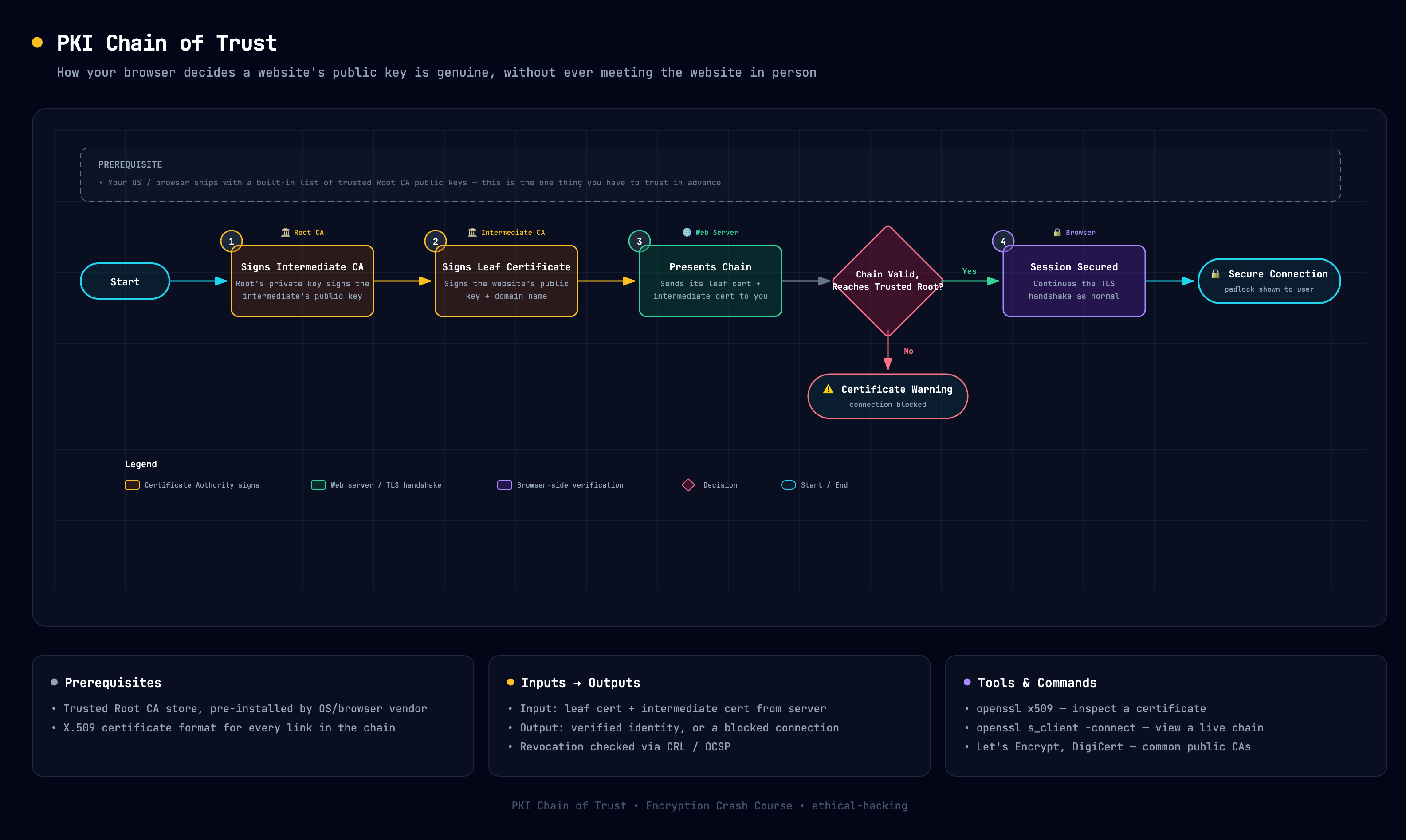
Open the interactive diagram — exportable as PNG/PDF.
- Digital certificate: A file (following the X.509 standard) that binds a public key to an identity — a domain name, an organization, a person. It’s essentially a digitally signed statement: “I, the issuer, vouch that this public key belongs to this identity.”
- Certificate Authority (CA): A trusted third party (e.g., Let’s Encrypt, DigiCert) that verifies an identity and signs its certificate. Your browser and OS ship with a built-in list of trusted root CAs.
- Chain of trust: Certificates are typically issued in a chain — a root CA signs an intermediate CA, which signs the end-entity certificate for a specific website. Your browser walks this chain back to a trusted root it already knows, so no single website has to be individually trusted in advance.
- Revocation: If a private key is compromised, its certificate must be invalidated before its expiry date. This is checked via CRLs (Certificate Revocation Lists) or the newer, faster OCSP (Online Certificate Status Protocol).
-
Quick example — inspecting a live website’s certificate chain from the terminal:
echo | openssl s_client -connect example.com:443 -servername example.com 2>/dev/null | openssl x509 -noout -subject -issuer -dates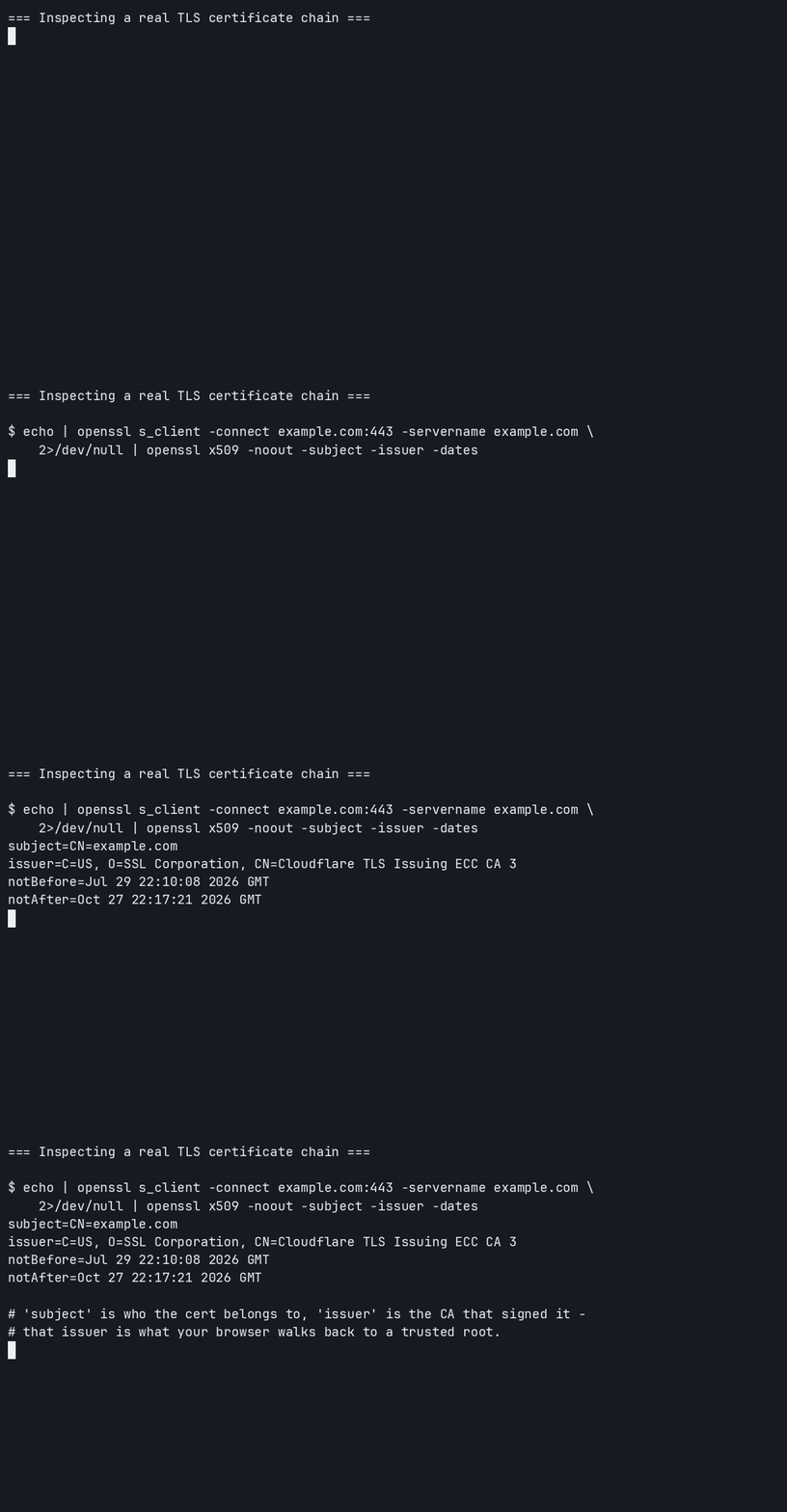
[!TIP] This is the missing piece that connects everything in this lesson: Diffie-Hellman establishes a shared secret, AES/ChaCha20 encrypts the data with it, HMAC/AEAD modes check integrity, and PKI/certificates confirm you negotiated that secret with the right party in the first place, not an attacker. TLS, covered next, wires all of these pieces together into one protocol.
SSL(Secure Sockets Layer) & TLS(Transport Layer Security)
[!IMPORTANT] SSL stands for Secure Sockets Layer, and TLS stands for Transport Layer Security. Both SSL and TLS are cryptographic protocols designed to provide secure communication over a computer network. TLS is the successor to SSL and is more secure and efficient than its predecessor.
-
TLS v1.3is the latest version of the TLS protocol, which was finalized in 2018. It offers improved security and performance compared to previous versions of TLS and SSL. TLS v1.3 removes support for older, less secure cryptographic algorithms and introduces new features to enhance security and reduce latency. -
TLS is the most important protocol for securing communication on the internet. It not only encrypts the data but also ensures data integrity and authentication. TLS is an End to End encryption protocol, which means that the data is encrypted from the sender to the receiver, and only the intended recipient can decrypt it. This makes it an essential component of secure communication on the internet, especially for sensitive transactions such as online banking, e-commerce, and secure email communication.
- TLS supports functionality of confidentiality, privacy, authentication & integrity.
- The connection is private because a symmetric algorithm such as AES is used to encrypt the data transmitted.
- The keys for this symmetric encryption are uniquely generated for each connection or session based on the needs of the application, based on a secret negotiated at the start of the connection.
- The server and client negotiate the details of which encryption algorithm, and cryptographic keys to use before even a single byte of data is transmitted.
- The negotiation of a shared secret cannot be read by eavesdroppers, even by an attacker who places himself in the middle of the connection.
- The connection is also reliable in that no attacker can modify the communication during the negotiation without being detected. The identity of the communicating parties can be authenticated using public key cryptography, certificates and digital signatures.
- This authentication can be made optional, but is generally required for at least one of the parties usually the server.
- The connection is reliable because each message transmitted includes a message integrity check. Using a Message Authentication Code (MAC), to prevent undetected loss or alteration of the data during transmission. If any message is modified, the connection is immediately terminated.
- TLS supports many different methods for exchanging keys, encrypting data and authenticating message integrity. As, a result secure configuration of TLS requires many configurable parameters, and not all choices provide the security services of privacy authentication and integrity.
[!NOTE] The best Authentication & Key Exchanging Algorithm to use are ECDHE (Elliptic Curve Diffie-Hellman Ephemeral) for key exchange and ECDSA (Elliptic Curve Digital Signature Algorithm) for authentication. These algorithms provide strong security while also being efficient in terms of performance. ECDHE allows for perfect forward secrecy, which means that even if the server’s private key is compromised in the future, past communications remain secure. ECDSA provides a secure method for verifying the identity of the communicating parties without the need for a trusted third party.
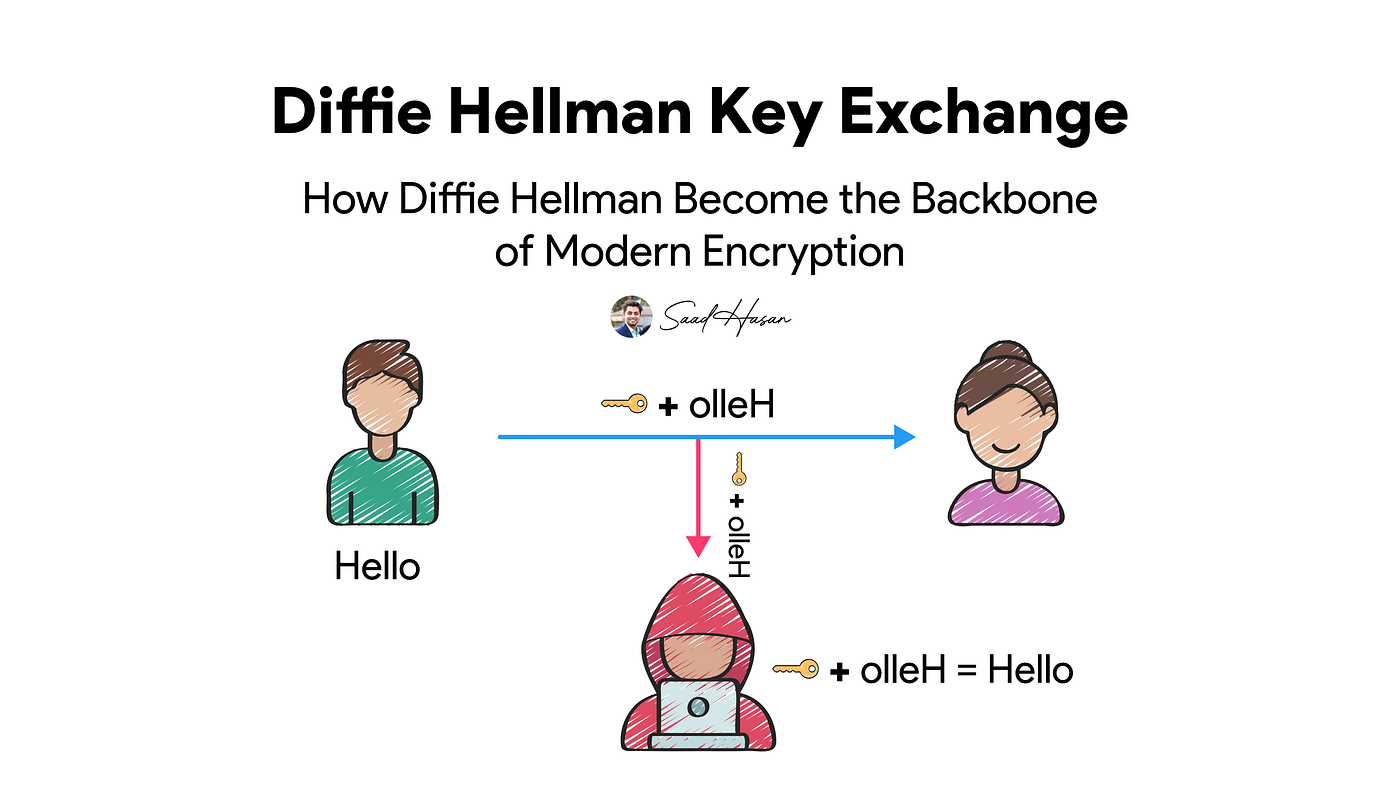
[!WARNING] But the problem is you don’t always get the choice. A server will support only certain authentication * key exchange algorithms only.
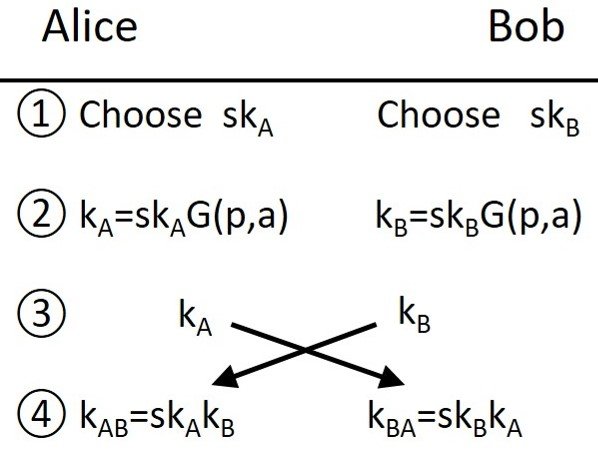
- The reason that the ones mentioned are the preferred options is because of the fact that they use Diffie-Hellman key exchange, which can ensure property of privacy called Perfect Forward Secrecy (PFS). This means that even if the server’s private key is compromised in the future, past communications remain secure because the session keys used for encryption are not derived from the server’s private key. This provides an additional layer of security and protects against future attacks on the server’s private key. Additionally, ECDHE and ECDSA are based on elliptic curve cryptography, which offers strong security with smaller key sizes compared to traditional algorithms like RSA, making them more efficient and suitable for modern applications.
-
Now, this property ensures that your session keys are not compromised even if the server’s private key is compromised in the future. This is because the session keys are generated using a key exchange algorithm that does not rely on the server’s private key, such as Diffie-Hellman.
-
As a result, even if an attacker gains access to the server’s private key, they would not be able to decrypt past communications that were encrypted with session keys generated through a secure key exchange process. This provides an additional layer of security and helps protect against future attacks on the server’s private key.
-
Even if compromise of a single session key will not affect any data other than that exchange in that specific session protected by that particular key. PFS represents a big step forward in protecting data on the transport layer.
Post-Quantum Cryptography
[!WARNING] Everything asymmetric covered in this lesson — RSA, Diffie-Hellman, ECDHE, ECDSA — relies on math problems (factoring large integers, discrete logarithms) that are hard for classical computers. A sufficiently powerful quantum computer running Shor’s Algorithm could solve those same problems efficiently, breaking all of them at once.
- What’s actually at risk: Only the asymmetric algorithms used for key exchange and signatures. Symmetric algorithms like AES aren’t broken outright by quantum computers — Grover’s Algorithm only halves their effective key strength, which is why AES-256 (not AES-128) is the recommended long-term choice.
- “Harvest now, decrypt later”: This is the reason to care today, not in 20 years. An adversary can record encrypted traffic now and simply store it, waiting until quantum computers are powerful enough to break the key exchange and decrypt it retroactively. Long-lived secrets (medical records, state secrets, source code) are already exposed to this risk.
- NIST’s standardized replacements (finalized in 2024): algorithms believed to resist both classical and quantum
attacks.
- ML-KEM / CRYSTALS-Kyber: For key exchange, replacing RSA/ECDHE.
- ML-DSA / CRYSTALS-Dilithium: For digital signatures, replacing RSA/ECDSA.
- Both are based on lattice mathematics, a different hard problem than factoring or discrete logarithms.
- What’s happening in practice: Browsers and TLS implementations (e.g., Chrome, Cloudflare) have already started rolling out hybrid key exchange — combining a classical algorithm like ECDHE with a post-quantum one like Kyber in the same handshake, so the connection stays secure even if only one of the two approaches turns out to be breakable.
[!TIP] You don’t need to change anything in your own projects today, but it’s worth knowing the direction the industry is moving: symmetric crypto (AES-256, SHA-256/384) is already considered quantum-resistant enough; asymmetric crypto is in the middle of a multi-year migration to lattice-based algorithms.